Best Smart Locks for Front Doors in 2026

- ✓Every guide starts as a full comparison video — we compare the gadgets side by side before we write a word.
- ✓Every pick is checked against the manufacturer’s own listings — specs come from the maker, not from another roundup.
- ✓Clear winners for every budget — the pick is the pick, whether it costs the least or the most.
- ✓No paid placements — a brand cannot pay to be picked.
This article contains Amazon affiliate links. As an Amazon Associate we earn from qualifying purchases — it never changes our picks. #ad
Best Smart Locks for Front Doors in 2026
Your front door lock is the one piece of smart home gear that has to work every single time. A light that fails is an annoyance; a lock that fails is a locksmith at midnight. The locks below are the strongest front-door deadbolts available, and they differ mainly in how you get in — a finger, a code, a phone, or a key — and in which smart home they belong to.
Start with how your household actually enters the house. Do you want to tap a phone, press a finger, type a code, or just have the door unlock as you walk up? Do you need codes for a cleaner, a dog walker or guests, and do you need to revoke them? And which voice assistant and smart home do you already use — Apple Home, Alexa, Google Home or SmartThings? A lock that fights your smart home will be a frustration every day.
Nothing here is presented as lab testing by us. Security ratings, battery claims, compatibility and subscription terms are taken from the makers’ own pages, manuals and shop listings. Where a maker and a listing disagree, the maker’s figure is used. One point to check on every lock here: a smart lock is only as strong as the door and the deadbolt it is fitted to, so check the door’s condition and the strike plate before you blame the lock.
Top 3
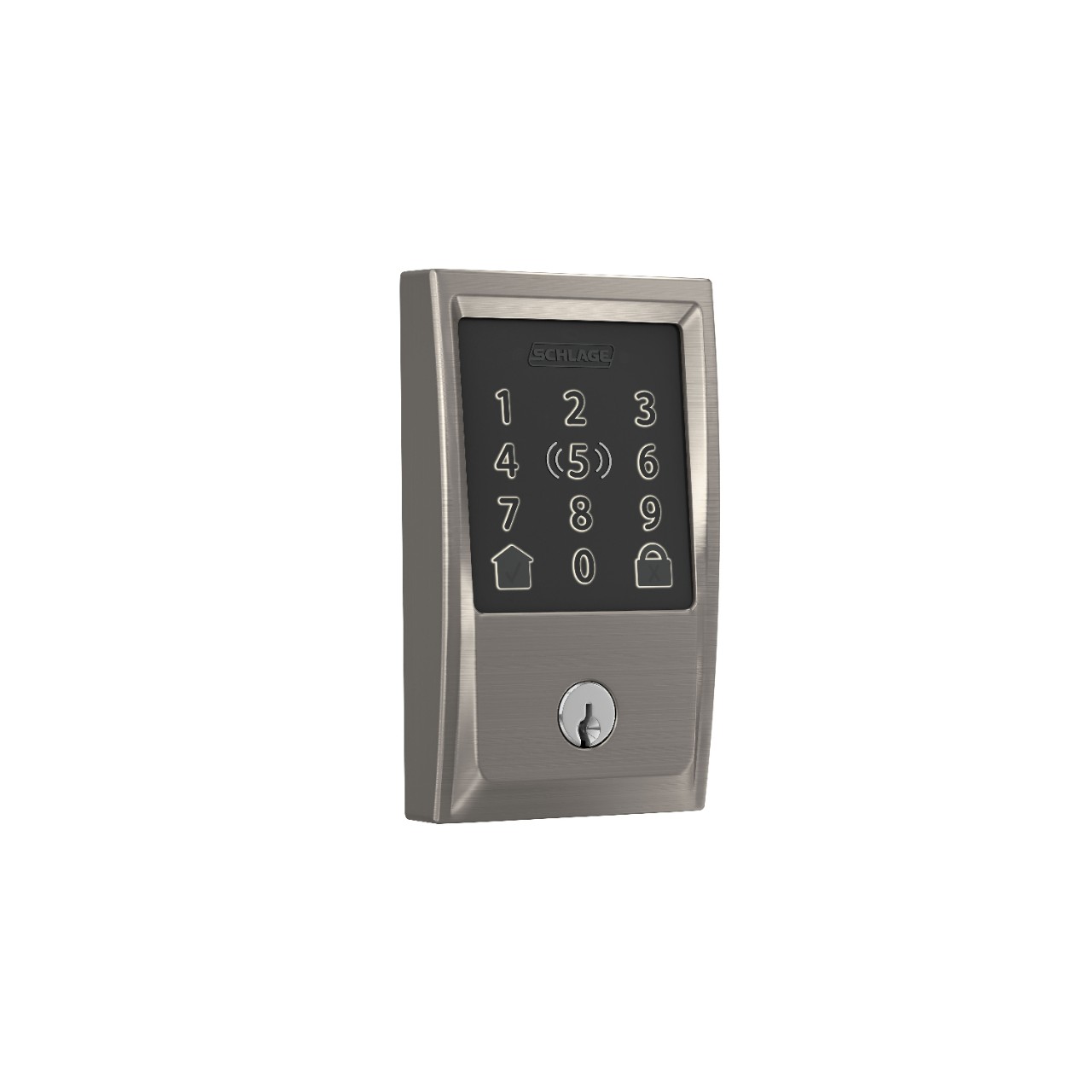
- Schlage Encode Plus — the best front-door lock overall A BHMA Grade AAA deadbolt with built-in Wi-Fi, Apple Home Key, up to 100 codes and no hub or subscription.
- Yale Assure Lock 2 Touch — the best key-free front-door lock Fingerprint and touchscreen with no keyhole at all, plus DoorSense alerts if the door is left open.
- ULTRALOQ U-Bolt Pro — the best fingerprint front-door lock Fingerprint, code, key and app in one lock, with a weather rating for an exposed front door.
How the Five Smart Locks for Front Doors Compare
| Lock | Best For | Unlock methods | Smart home | Battery (maker figure) |
|---|---|---|---|---|
| Schlage Encode Plus | Overall | Code, key, app, Apple Home Key | Apple Home, Alexa | Up to 6 months |
| Yale Assure Lock 2 Touch | Key-free | Fingerprint, code, app | Apple Home, Alexa, Google | Up to 6 months |
| ULTRALOQ U-Bolt Pro | Fingerprint | Fingerprint, code, key, app | Alexa, Google | Up to 1 year |
| August Wi-Fi Smart Lock (4th Gen) | Retrofit front door | App, auto-unlock, key | Apple Home, Alexa, Google | Up to 6 months |
| Kwikset Halo | Budget front door | Code, key, app | Alexa, Google | Up to 6 months |
The Best Overall — Schlage Encode Plus
Schlage Encode Plus — Best Overall
The Schlage Encode Plus is the strongest front-door lock in this group, and the best all-rounder. It is a BHMA Grade AAA deadbolt — the highest residential security grade — with a touchscreen keypad, built-in Wi-Fi, and Apple Home Key, so you can tap an iPhone or Apple Watch to unlock. It holds up to 100 access codes, needs no hub and no subscription, and works with Apple Home and Alexa.
Its strength is that it does everything without asking for anything extra: no hub, no bridge, no monthly fee. The trade-off is that it is a full replacement deadbolt, so fitting takes longer than a retrofit lock, and it is a premium lock with a premium outlay. For a front door that needs to be secure, convenient and easy to manage, it is the pick.
Our Call
For a front door, this is the lock to buy. It is the most secure, the most complete, and it asks for nothing extra.
Pros
- BHMA Grade AAA — highest residential grade
- Apple Home Key tap-to-unlock
- Built-in Wi-Fi, no hub or subscription
- Up to 100 access codes
Cons
- Full replacement — fitting takes longer
- Premium outlay
- No fingerprint reader
- Touchscreen needs clean, dry fingers in rain
The Best Key-Free — Yale Assure Lock 2 Touch
Yale Assure Lock 2 Touch — Best Key-Free
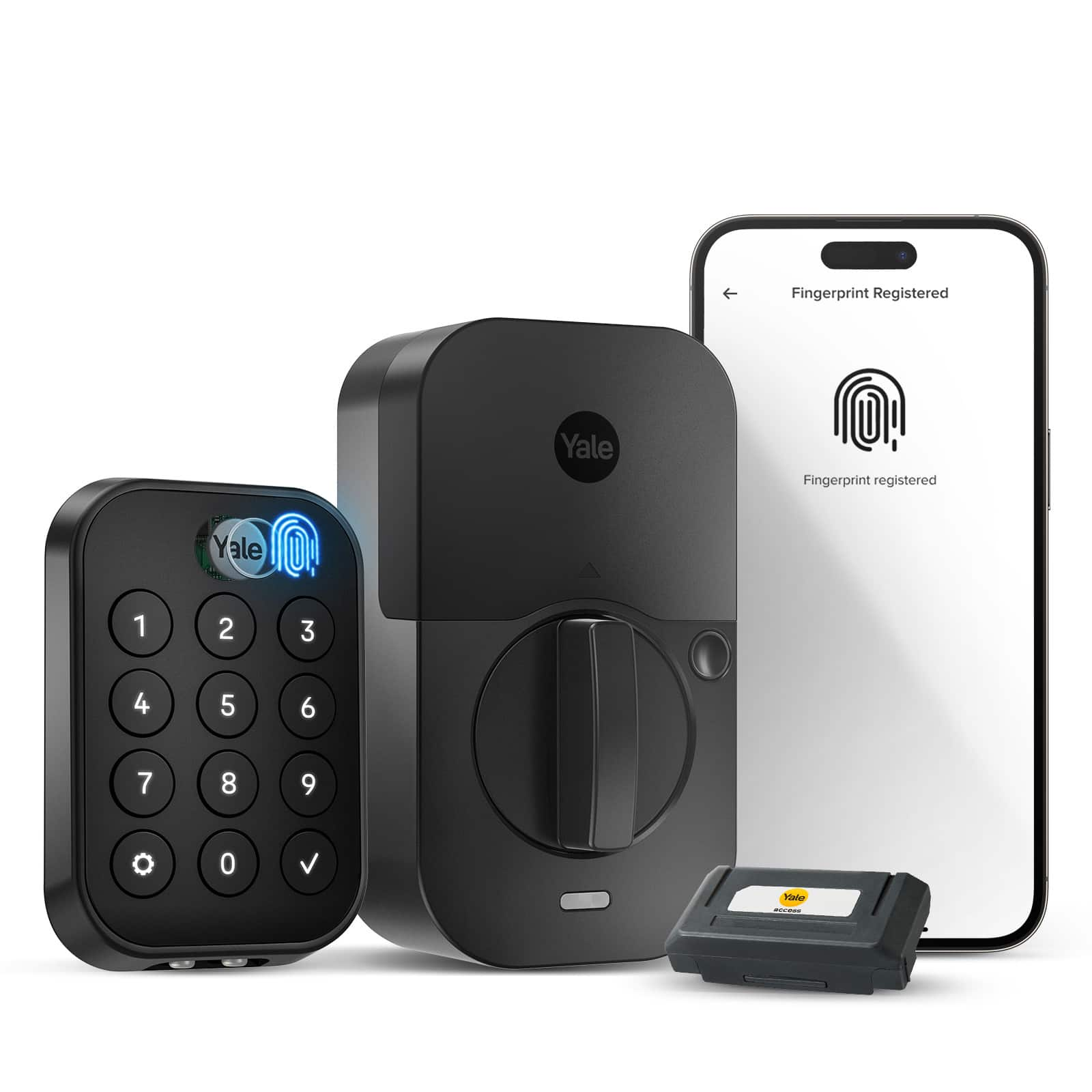
The Yale Assure Lock 2 Touch is the key-free lock in this group: there is no keyhole at all. You get in with a fingerprint or a code on its touchscreen, and it includes a Wi-Fi module in the box, so there is no hub to buy. It also includes DoorSense, which tells you in the app if the door is open, closed or ajar — the feature owners say they check most.
Going key-free is a commitment: if the batteries die and you have no code memorised, you are locked out until you use the backup power contacts. Yale’s answer is a 9V battery contact on the outside and long battery life, but it is worth keeping a code with a trusted neighbour. For a household that wants no keys at all, and a lock that looks clean on the door, it is the best choice here.
Our Call
For a household ready to go key-free, this is the pick. It is the cleanest lock here, with the best door-ajar alerts.
Pros
- No keyhole — fingerprint and code only
- Wi-Fi module included, no hub
- DoorSense door-ajar alerts
- Clean, modern design
Cons
- No key backup if batteries die
- Keep a code with a trusted neighbour
- Fingerprint reader needs clean fingers
- Full replacement fitting
The Best Fingerprint — ULTRALOQ U-Bolt Pro
ULTRALOQ U-Bolt Pro — Best Fingerprint
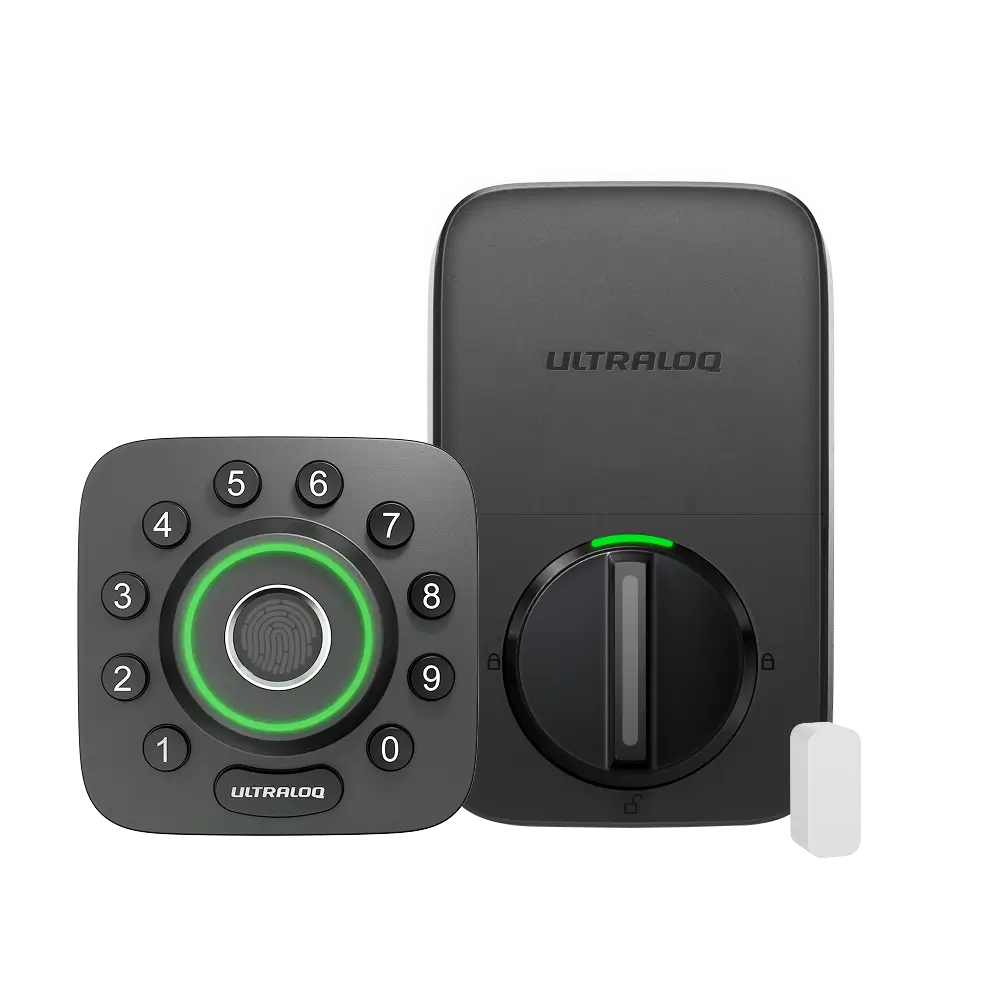
The ULTRALOQ U-Bolt Pro is the fingerprint specialist: a 360-degree fingerprint reader that works from any angle, plus a code, a key and app control, all in one deadbolt. It carries an IP65 weather rating, so it suits an exposed front door, and the maker rates its battery at up to a year — the longest claim in this group.
Its trade-off is remote access, which needs the ULTRALOQ Bridge, sold separately. Without the Bridge, the lock works locally — fingerprint, code and key — but you cannot lock it from away from home or grant remote access. For a household that values fast fingerprint entry above all, and is happy to add the Bridge for remote features, it is the most capable lock here.
Our Call
For fingerprint entry on a front door, this is the pick. Add the Bridge if you want remote access.
Pros
- 360-degree fingerprint reader
- Fingerprint, code, key and app
- IP65 weather rating
- Battery rated at up to a year
Cons
- Remote access needs a separate Bridge
- Fingerprint reader needs clean, dry fingers
- Bulkier than a keypad-only lock
- Full replacement fitting
The Best Retrofit — August Wi-Fi Smart Lock (4th Gen)
August Wi-Fi Smart Lock (4th Gen) — Best Retrofit

The August Wi-Fi Smart Lock is the retrofit option for a front door: it fits over the inside of your existing deadbolt, leaving the outside unchanged, and your old key still works. It has Wi-Fi built in, with auto-unlock as you approach, remote locking from the app, and temporary keys for guests. Fitting takes minutes, with no drilling and no change to the outside of the door.
Its trade-off is that it has no keypad of its own, so codes need the app or a separate keypad accessory, and it relies on your existing deadbolt’s security — if your deadbolt is old or weak, the August does not fix that. For a front door where you want smart features without replacing a good deadbolt, it is the easiest and least disruptive pick here.
Our Call
For a front door with a good deadbolt you want to keep, this is the pick. It adds smart features without changing the door.
Pros
- Fits over your existing deadbolt
- Outside of the door unchanged
- Wi-Fi built in, no hub
- Auto-unlock and guest keys
Cons
- No keypad built in
- Relies on your existing deadbolt’s security
- Auto-unlock needs your phone
- Battery life depends on use
The Best Budget Front Door — Kwikset Halo
Kwikset Halo — Best Budget Front Door

The Kwikset Halo is the budget front-door lock in this group: a Wi-Fi keypad deadbolt with a touchscreen, app control and codes for family and guests, working with Alexa and Google Home. It is a full replacement deadbolt, it is easy to fit, and it does the core job — keyless entry with codes — for the lowest outlay here.
Its trade-off is that it has no fingerprint reader, no Apple Home Key, and a simpler design than the Schlage or Yale. It is also the lock most likely to be chosen for a side door or a rental property, where the budget matters more than the badge. No verified Amazon listing for this exact model could be pinned down in this round of work, so this guide has no buy link for it; check Kwikset’s own store and the listing before you buy.
Our Call
For a front door on a budget, this is the pick. It does keyless entry well, and it costs the least to buy.
Pros
- Lowest-cost front-door lock here
- Wi-Fi keypad with app control
- Codes for family and guests
- Easy to fit
Cons
- No fingerprint reader or Apple Home Key
- No verified Amazon listing found in this round
- Simpler design than premium rivals
- Fewer smart-home integrations
A note on the door itself. A smart lock is only as strong as the door it is fitted to. Before you buy, check the door’s condition: is it solid, does it close squarely, and is the strike plate screwed into the frame with long screws, or just into the trim? A three-inch screw into the frame is the cheapest security upgrade you can buy, and it matters more than the difference between two locks. Also check the deadbolt’s backset and the door’s thickness against the maker’s requirements — a lock that does not fit your door is a return, not a project.
Buying Guide
Security grade first. A front-door lock should carry a BHMA grade — AAA is the highest residential grade, and the Schlage Encode Plus is the only lock here that holds it. Check the grade before you compare features, because a lock with a fingerprint reader and a weak bolt is a weak lock.
Choose your way in. Fingerprint is fastest, a code is easiest to share, a phone tap is most convenient for Apple households, and a key is the backup that never needs a battery. Most households use two methods — a fingerprint or code for daily use, and a key for emergencies — so pick a lock that offers both.
Count the codes. If you have a cleaner, a dog walker, guests and family, you need a lock that holds many codes and lets you revoke them individually. The Schlage holds up to 100; cheaper locks hold fewer. Check the number before you buy, not after you have run out.
Check the smart home, not just the lock. Apple Home Key only works in Apple Home, and some locks work with Alexa and Google but not Apple. Buy the lock that belongs to the smart home you already use, or you will be managing it in a separate app forever.
Fit the door, not just the lock. A smart lock is only as strong as the door, the frame and the strike plate. Check the deadbolt’s backset, the door’s thickness, and whether the strike plate is screwed into the frame or just the trim. A long strike-plate screw is the cheapest security upgrade you can buy.
What is the best smart lock for a front door?
The Schlage Encode Plus, because it is a BHMA Grade AAA deadbolt with built-in Wi-Fi, Apple Home Key, up to 100 codes and no hub or subscription. It is the most secure and most complete lock in this group.
Are smart locks safe for front doors?
A good one is: look for a BHMA grade, a solid deadbolt and a reputable maker. A smart lock is only as strong as the door and strike plate it is fitted to, so check those too.
Do smart locks need Wi-Fi?
For remote locking and alerts, yes. For local unlocking — fingerprint, code or key — no. The August and Schlage have Wi-Fi built in; the ULTRALOQ needs a Bridge for remote access.
Can a smart lock be fitted to any front door?
Most standard front doors, yes, if the deadbolt, backset and door thickness match the lock’s requirements. Check the maker’s compatibility list and measure your door before you buy.
What happens if a smart lock battery dies?
Most locks warn you in the app well before the battery dies, and most have a backup: a physical key, or a 9V battery contact on the outside. Keep a key or a code with a trusted neighbour as a backup.
Conclusion
Start with the Schlage Encode Plus for most front doors — it is the most secure and most complete lock here. Choose the Yale Assure Lock 2 Touch if you want to go key-free, the ULTRALOQ U-Bolt Pro if fingerprint entry matters most, and the August if you want to keep your existing deadbolt. Check the BHMA grade and your smart home before you buy, and the right lock will be obvious.


