
Best Video Doorbells 2026: Which Ones Record Without a Subscription?
The best video doorbells no subscription buyers should start with are the eufy E340 and the Reolink Video Doorbell WiFi, the only two here that record locally with no plan required. Google Nest gives free smart alerts but only 3 hours of history, while Ring, Blink and Arlo each keep something important behind a paywall. That record-locally picture is what a best video doorbell without subscription search should weigh first, so compare what each listing stores on its own before judging any single doorbell.
A video doorbell should be a simple purchase: a camera at your door that records who came by. Instead, most big-name doorbells have quietly become subscription products with a camera attached — where watching yesterday’s footage, or getting an alert that a package arrived, costs money every month. We went through the six most popular doorbells of 2026 and checked, model by model, what actually works without a plan. Two record fully on their own. The other four each draw the line somewhere different — and that line should decide your purchase. That simple-purchase picture is the honest test in any video doorbell without subscription search, so check the listing for what still works once no plan is active.
Key Takeaways
- Record fully on their own: only two of the six — the eufy E340 and the Reolink Video Doorbell WiFi — record locally with no plan required; eufy is the article’s top pick for most homes.
- eufy E340: dual cameras (2K main camera plus a downward package camera), built-in local storage with no monthly fee, on-device people, package and face detection, battery or hardwired.
- Reolink Video Doorbell WiFi: 2K head-to-toe video, local recording to microSD (listing supports cards up to 512GB) or a Reolink NVR, on-device person, vehicle and package detection, dual-band Wi-Fi, wired only.
- Middle ground: Google Nest Doorbell (Battery) gives intelligent person, package, animal and vehicle alerts free, but free event history is limited to 3 hours.
- Paywall group: Ring, Blink, and Arlo each keep something important behind a paywall — pick them only with the plan cost counted in from day one.
At a Glance
| Product | Best for | Key spec(s) | Link |
|---|---|---|---|
| eufy Video Doorbell E340 | Best no-subscription overall | Dual cameras (2K main camera plus a downward package camera), built-in local storage with no monthly fee, on-device people, package and face detection, battery or hardwired | View on Amazon |
| Reolink Video Doorbell WiFi | Best wired no-subscription pick | 2K head-to-toe video, local recording to microSD (listing supports cards up to 512GB) or a Reolink NVR, on-device person, vehicle and package detection, dual-band Wi-Fi, wired only | View on Amazon |
| Google Nest Doorbell (Battery) | Best free smart alerts | HDR video, intelligent person, package, animal and vehicle alerts free with no subscription required, free event history limited to 3 hours, battery or wired | View on Amazon |
| Arlo Video Doorbell 2K | Best video quality | 2K HDR head-to-toe video, built-in siren, video-call answering, live view and basic alerts without a plan; recognition, captions, activity zones and 60-day history sit in Arlo Secure | View on Amazon |
| Blink Video Doorbell (2nd Gen) | Best budget option | Head-to-toe HD view, up to two years of battery life on the included AA lithium batteries, Sync Module Core in the box; person detection and saved clips require a Blink Subscription Plan | View on Amazon |
| Ring Battery Doorbell | Most popular, with a catch | Head-to-Toe HD video, easy install, battery or hardwired; no video history at all without a Ring Home plan, and person and package alerts are subscription features too | View on Amazon |
When we compared these side by side for our Smart Tech & Gadget Finds video, the split was not about picture quality first. It was about what still worked once no plan was active. In our comparison, that one test sorted the six faster than any spec list.
Top 3 Picks
eufy Video Doorbell E340 — Best No-Subscription Overall. The top pick for most homes: dual cameras covering visitors and packages, built-in local storage with no monthly fee, and on-device people, package and face detection.
Reolink Video Doorbell WiFi — Best Wired No-Subscription. The better fit if your home already has doorbell wiring: 2K head-to-toe video, local recording to microSD or a Reolink NVR, on-device detection, and dual-band Wi-Fi, wired only.
Google Nest Doorbell (Battery) — Best Free Smart Alerts. The most generous of the big names on alerts: intelligent person, package, animal and vehicle alerts are free, but free event history is only 3 hours.
Arlo Video Doorbell 2K, Blink Video Doorbell (2nd Gen), and Ring remain in the full comparison below, each with part of the experience behind a paywall. That behind-a-paywall split is the honest test in any ring doorbell without subscription search, so check the listing for what a doorbell keeps doing once no plan is active.
The Doorbells That Record Free
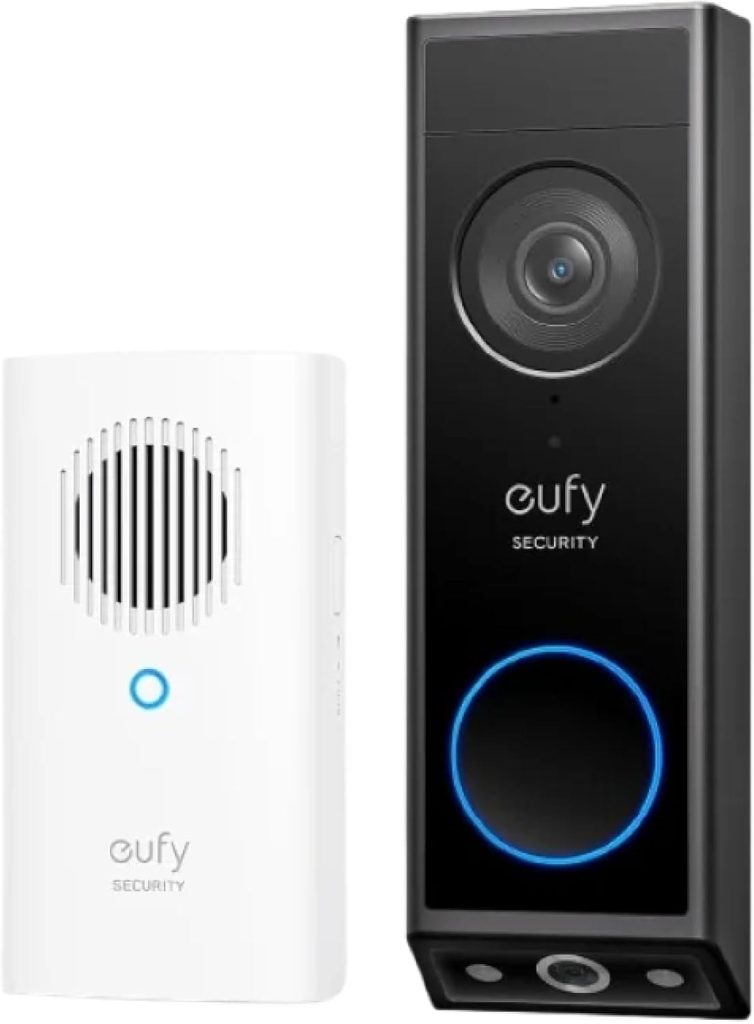
eufy Video Doorbell E340 — our top pick. The eufy E340 uses two cameras — a 2K main camera for visitors and a second, downward-facing one for packages — recording to built-in local storage with no monthly fee. Detection for people, packages, and faces runs on the device. It runs on a quick-release battery pack or hardwired, standalone or with a HomeBase, and this listing bundles a white plug-in chime.
Pros
- Two cameras cover visitors and the packages at their feet in one split view in the app.
- Records to built-in local storage with no monthly fee to record or play back.
- People, package and face detection run on the device, not behind a cloud plan.
- Runs on a quick-release battery pack or hardwired, standalone or with a HomeBase, and this listing bundles a chime.
Cons
- It is a tall unit, so narrow door frames need measuring first.
- The built-in archive is finite and overwrites older clips as it fills, unless you pool footage with a HomeBase.
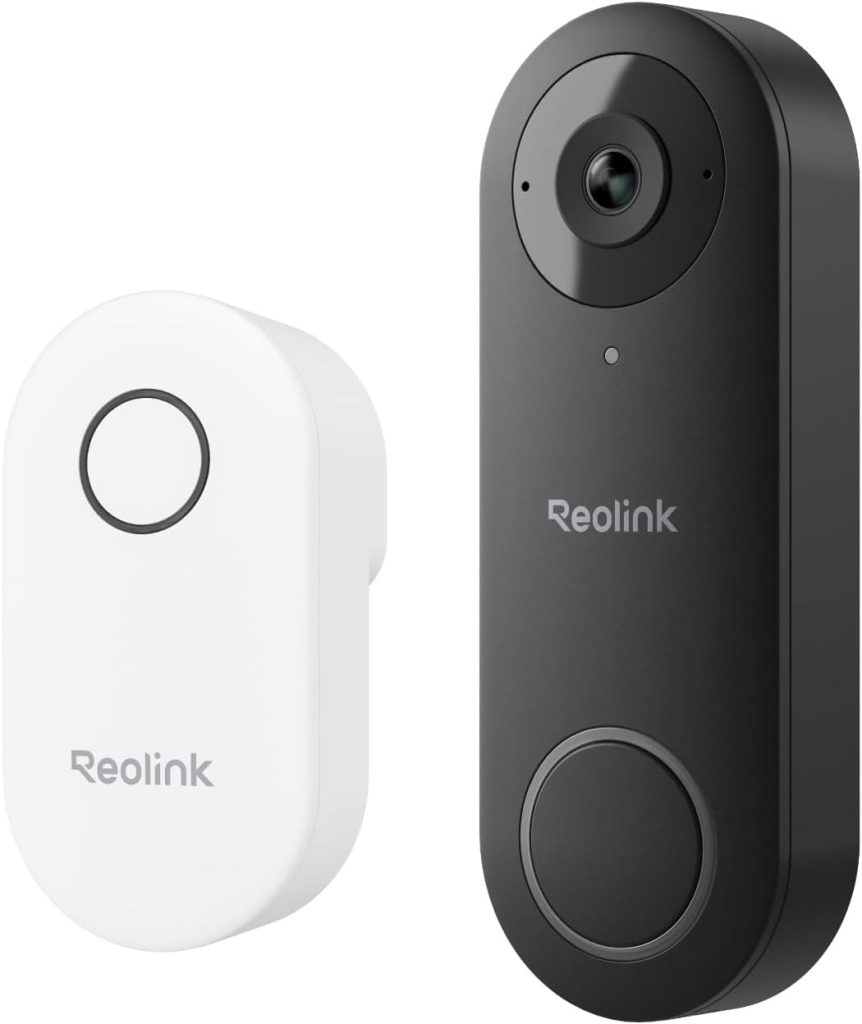
Reolink Video Doorbell WiFi. The Reolink doorbell records 2K head-to-toe video to a microSD card (the listing supports cards up to 512GB) or to a Reolink NVR, with person, vehicle, and package detection on-device and no subscription. Its optional cloud plan is genuinely optional — nothing core is locked behind it. The catch is installation: this model is wired only, and its Live Video Call feature is iOS-only.
Pros
- 2K head-to-toe video with person, vehicle and package detection on the device.
- Local recording to microSD, with the listing supporting cards up to 512GB, or to a Reolink NVR, with no subscription.
- Dual-band Wi-Fi (2.4GHz and 5GHz) and a plug-in chime bundled in the box.
- The optional cloud plan is genuinely optional. Nothing core is locked behind it.
Cons
- Wired only. There is no battery in this model, so homes without doorbell wiring cannot use it without electrical work.
- Live Video Call works on iOS only, per the listing.
- Footage lives on the card at your door, with no cloud backup unless you add the optional plan.
The Middle Ground
Google Nest Doorbell (Battery). The Nest Doorbell is the most generous of the big names on alerts: intelligent person, package, animal, and vehicle alerts are free — no subscription required — and it can keep up to an hour of events on-device during an outage. But free event history is only 3 hours; longer history (up to 60 days) requires Nest Aware. On a busy street, three hours is not much.
Pros
- Intelligent person, package, animal and vehicle alerts are free, with no subscription required.
- It can keep up to an hour of events on-device during a Wi-Fi or power outage.
- Battery or wired install gives it more placement flexibility than a wired-only model.
Cons
- Free event video history is only 3 hours, which goes fast on a busy street.
- Longer history, up to 60 days, requires Nest Aware.
Where the Paywall Bites
Arlo Video Doorbell 2K. The Arlo doorbell has arguably the best hardware here — 2K HDR head-to-toe video, a built-in siren, video-call answering — and live view plus basic alerts work without a plan. But person, vehicle, package, and animal recognition, event captions, activity zones, and 60-day video history live in Arlo Secure once the included 1-month trial ends.
Pros
- 2K HDR head-to-toe video, a built-in siren, and video-call answering give it strong hardware.
- Live view and basic alerts work without a plan.
- Wide smart-home support in the kit research, including Alexa, Google Home, IFTTT and Samsung SmartThings.
Cons
- Person, vehicle, package and animal recognition, event captions, activity zones and 60-day video history live in Arlo Secure after the trial.
- Apple Home use requires an Arlo SmartHub, per the listing research.
Blink Video Doorbell (2nd Gen). The Blink doorbell is the budget option: up to two years of battery life on the included AA lithium batteries, and a Sync Module Core in the box. However, person detection, saved cloud clips, Blink Moments, and AI Video Descriptions all require a Blink Subscription Plan (a 30-day trial is included). Without it, this is largely a live-view doorbell.
Pros
- Up to two years of battery life on the included AA lithium batteries.
- Sync Module Core is included in the box.
- Head-to-toe HD view with two-way talk, per the listing.
Cons
- Person detection, saved cloud clips, Blink Moments and AI Video Descriptions all require a Blink Subscription Plan.
- A 30-day trial is included, but the paid features end with it.
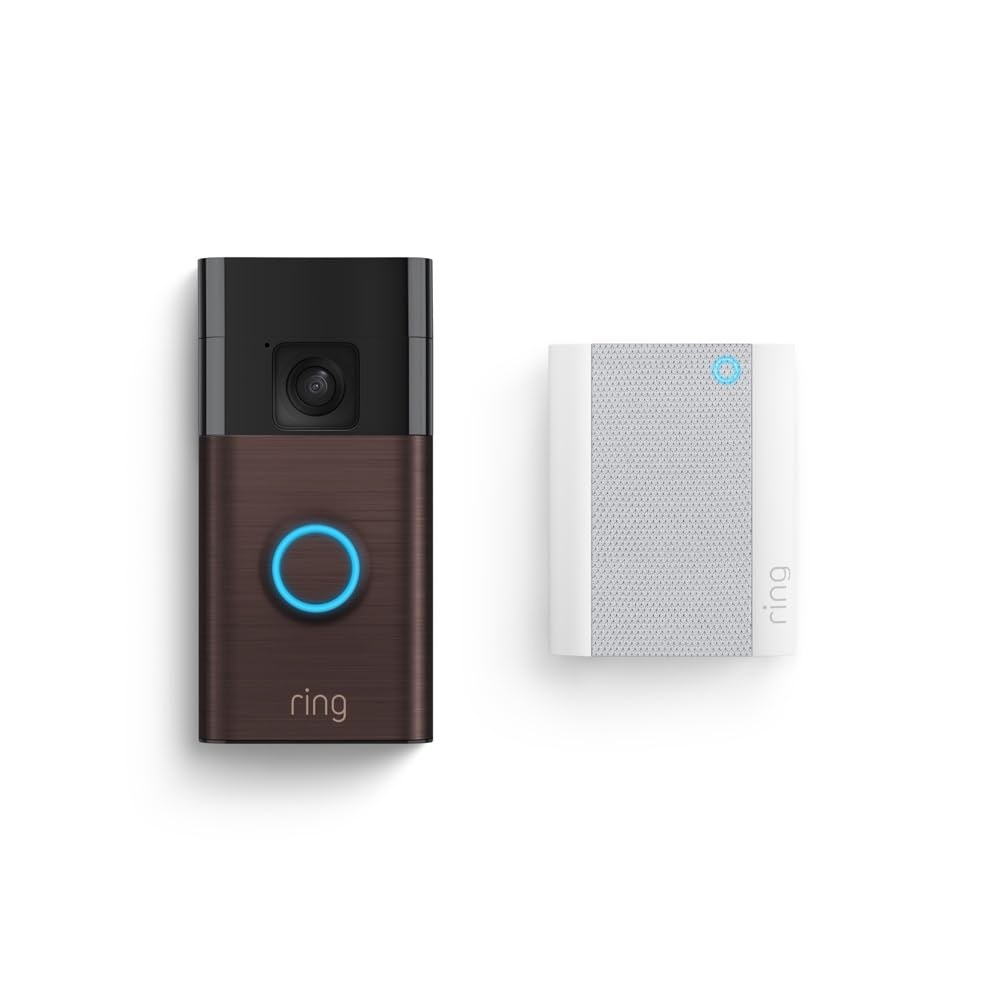
Ring Battery Doorbell. The Ring Battery Doorbell shoots good head-to-toe HD video and is easy to install — but without a Ring Home plan there is no video history at all, and person and package alerts are subscription features too.
Pros
- Good head-to-toe HD video and an easy install.
- Flexible power, on a built-in rechargeable battery or hardwired.
- This listing bundles a plug-in Chime, so the bell rings inside the house.
Cons
- No video history at all without a Ring Home plan. If you miss the live view, there is nothing to play back.
- Person and package alerts are subscription features too.
What to Know Before You Buy
- “Free alerts” and “free history” are different things. Nest proves the point: the alerts cost nothing; the memory does.
- Local storage means the footage is physically yours — on a card or built-in memory, not a company’s server.
- Check your wiring: Reolink needs existing doorbell wiring; eufy, Nest, Blink, and Ring can run on battery.
- Trials end (Blink and Arlo include them). Judge each doorbell by what still works on day 31 without paying.
Total Cost Over Time as a Listing Question
One guide describes comparing what a doorbell costs over time rather than only at purchase, but cost figures from that guide are not verified by this review for any doorbell here. Check each listing for what its paid plan covers and what it costs over time, and compare that total against what each doorbell records without a plan, rather than assuming any figure from another guide.
Why Subscription-Free Matters as a Buying Question
One guide frames subscription-free recording as a question of what a buyer keeps when no plan is active, but that framing is not verified by this review as a claim about any doorbell here. Use it only to ask what each listing keeps recording, alerting, and storing without a plan, and check the listing for the answer rather than assuming any outcome from another guide.
HomeKit Compatibility as a Listing Question
One guide discusses smart-home compatibility as a column buyers check, but this article states no compatibility details for any doorbell here, and compatibility claims from other guides are not verified by this review. Check each listing for which smart-home platforms it actually names, and do not assume any platform support or absence from another guide.
Recording During Internet Outages as a Listing Question
One guide asks what happens to footage when the connection drops, but outage behavior described in other guides is not verified by this review for any doorbell here. Check each listing for what it says about recording and viewing when the connection is down, and do not assume any behavior from another guide.
Notifications Without a Plan as a Listing Question
One guide asks whether doorbells still send notifications without a plan, but notification behavior described in other guides is not verified by this review for any doorbell here. Check each listing for which notifications it provides without a plan, and do not assume any notification picture from another guide.
Free Cloud Storage Reliability as a Listing Question
One guide asks whether free cloud storage can be relied on, but reliability claims from other guides are not verified by this review for any doorbell here. Check each listing for what free storage, if any, it offers and what limits apply to it, and do not assume any reliability picture from another guide.
Renters as a Buying Question
One guide asks which doorbells suit renters, but renter recommendations from other guides are not verified by this review for any doorbell here. Use the question only to weigh wiring, mounting, and removal needs against what each listing states, and do not treat any renter pick from another guide as a recommendation from this comparison.
Security-System Need and Professional Monitoring as Listing Questions
One guide asks whether a doorbell camera replaces a security system and whether professional monitoring works without a plan, but answers to those questions from other guides are not verified by this review for any doorbell here. Check each listing for what monitoring, if any, it offers without a plan, and do not assume any monitoring picture from another guide.
MicroSD Card Need as a Listing Question
One guide asks whether a no-subscription doorbell needs a memory card, but card requirements described in other guides are not verified by this review for any doorbell here. Check each listing for whether it uses a card, whether one is included, and what happens when no card is fitted, and do not assume any card picture from another guide.
Local-Storage Paths Explained
One guide explains local storage as a set of paths — built-in storage, a memory card, a recorder, and network storage — but which path any doorbell here uses is stated only in this comparison’s own product sections, and path claims from other guides are not verified by this review. Use the paths only as a checklist for reading each listing, and check the listing for which path it actually names.
Video Quality and Night Vision as Listing Questions
One guide explains video quality and night vision as topics buyers check — how clearly a face can be identified, infrared versus color night viewing, and dynamic range — but quality and night-vision claims from that guide are not verified by this review for any doorbell here. Check each listing for what it states on those topics, and do not assume any quality or night-vision picture from another guide.
Power Source as a Listing Question
One guide treats power source as a choice between wired and battery doorbells, but battery-life and cold-weather claims from that guide are not verified by this review for any doorbell here. Check each listing for which power options it offers and what wiring it needs, and do not assume any power picture from another guide.
Smart-Home Integration as Listing Questions
One guide treats smart-home integration as a set of questions — voice assistants, smart displays, chime announcements, and local protocols — but integration claims from that guide are not verified by this review for any doorbell here. Check each listing for which integrations it actually names, and do not assume any integration picture from another guide.
Privacy and Security Practices as Listing Questions
One guide treats privacy and security as topics buyers check — sign-in protections and encryption of stored footage — but privacy and security claims from that guide are not verified by this review for any doorbell here. Check each maker’s own privacy and security pages for what it states, and do not assume any privacy or security picture from another guide.
Testing Methodology as Buyer Questions
One guide describes how it tests doorbells, but test results from that guide are not verified by this review for any doorbell here. Treat its test dimensions only as questions to ask — how a doorbell was set up, what was checked, and under what conditions — and do not treat any result from another guide as a result for a doorbell in this comparison.
Buyer Checklist: Features Worth Checking
One guide offers a buyer checklist — picture clarity, field of view and aspect ratio, local versus cloud storage, advanced features, and sign-in protections — but checklist items from that guide are not verified by this review as findings about any doorbell here. Use the checklist only to read each listing with the same questions in mind, and check the listing for the answer to each one.
Wi-Fi Performance as a Listing Question
One guide asks how well doorbells perform on a home wireless network, including signal strength and whether a repeater helps, but performance claims from that guide are not verified by this review for any doorbell here. Check each listing for what it states about wireless requirements, and do not assume any performance picture from another guide.
Use Without Wi-Fi as a Listing Question
One guide asks whether a doorbell can be used without a wireless network at all, but such claims from other guides are not verified by this review for any doorbell here. Check each listing for what connection it requires and what, if anything, it records without one, and do not assume any offline picture from another guide.
Who It’s For
Subscription-averse buyers should shortlist the eufy E340 (battery flexibility, dual cameras) and the Reolink (wired, huge local storage). Choose Ring, Blink, or Arlo only if you have read what their plans lock away and decided the trade is worth it. That shortlist-first approach is what a best video doorbell no subscription search should follow, so start from what each listing records without a plan and work outward from there.
FAQ
Which video doorbells record without a subscription?
On the facts in this comparison, the eufy E340 and the Reolink Video Doorbell WiFi are the two that record locally with no plan required. The eufy records to built-in local storage, and the Reolink records to a microSD card or a Reolink NVR.
Does a Ring doorbell record anything without a plan?
Live view works without a plan, but there is no video history without a Ring Home plan. Person and package alerts are subscription features too, so a Ring without a plan is mostly a live-view doorbell.
Does the Nest doorbell need a subscription for smart alerts?
No. Intelligent person, package, animal and vehicle alerts are free, with no subscription required. The limit is history: free event video history is only 3 hours, and longer history up to 60 days requires Nest Aware.
Which of these work if my home has no doorbell wiring?
Battery models are the route. In this lineup, the eufy E340, Nest, Blink and Ring can run on battery, and the eufy can also be hardwired. The Reolink in this comparison is wired only, so check for existing doorbell wiring before you choose it.
What changes when the Blink and Arlo trials end?
Judge both by what still works on day 31. For Blink, person detection, saved cloud clips, Blink Moments and AI Video Descriptions require a Blink Subscription Plan. For Arlo, recognition, event captions, activity zones and 60-day video history sit in Arlo Secure after the included 1-month trial.
What does a doorbell cost over time, not just at purchase?
One guide describes comparing what a doorbell costs over time rather than only at purchase, but cost figures from that guide are not verified by this review for any doorbell here. Check each listing for what its paid plan covers and what it costs over time, and compare that total against what each doorbell records without a plan.
Why does subscription-free recording matter?
One guide frames subscription-free recording as a question of what a buyer keeps when no plan is active, but that framing is not verified by this review as a claim about any doorbell here. Use it only to ask what each listing keeps recording, alerting, and storing without a plan.
Which smart-home platforms should I check for?
One guide discusses smart-home compatibility as a column buyers check, but this article states no compatibility details for any doorbell here, and compatibility claims from other guides are not verified by this review. Check each listing for which smart-home platforms it actually names.
What happens to footage when the connection drops?
One guide asks what happens to footage when the connection drops, but outage behavior described in other guides is not verified by this review for any doorbell here. Check each listing for what it says about recording and viewing when the connection is down.
Do doorbells still send notifications without a plan?
One guide asks whether doorbells still send notifications without a plan, but notification behavior described in other guides is not verified by this review for any doorbell here. Check each listing for which notifications it provides without a plan.
Can free cloud storage be relied on?
One guide asks whether free cloud storage can be relied on, but reliability claims from other guides are not verified by this review for any doorbell here. Check each listing for what free storage, if any, it offers and what limits apply to it.
What should renters weigh before choosing?
One guide asks which doorbells suit renters, but renter recommendations from other guides are not verified by this review for any doorbell here. Use the question only to weigh wiring, mounting, and removal needs against what each listing states.
Do I still need a security system or professional monitoring?
One guide asks whether a doorbell camera replaces a security system and whether professional monitoring works without a plan, but answers to those questions from other guides are not verified by this review for any doorbell here. Check each listing for what monitoring, if any, it offers without a plan.
Does a no-subscription doorbell need a memory card?
One guide asks whether a no-subscription doorbell needs a memory card, but card requirements described in other guides are not verified by this review for any doorbell here. Check each listing for whether it uses a card, whether one is included, and what happens when no card is fitted.
What are the local-storage paths?
One guide explains local storage as a set of paths — built-in storage, a memory card, a recorder, and network storage — but which path any doorbell here uses is stated only in this comparison’s own product sections, and path claims from other guides are not verified by this review. Use the paths only as a checklist for reading each listing.
What should I check on video quality and night vision?
One guide explains video quality and night vision as topics buyers check — how clearly a face can be identified, infrared versus color night viewing, and dynamic range — but quality and night-vision claims from that guide are not verified by this review for any doorbell here. Check each listing for what it states on those topics.
Wired or battery — what should I check?
One guide treats power source as a choice between wired and battery doorbells, but battery-life and cold-weather claims from that guide are not verified by this review for any doorbell here. Check each listing for which power options it offers and what wiring it needs.
Which smart-home integrations should I check for?
One guide treats smart-home integration as a set of questions — voice assistants, smart displays, chime announcements, and local protocols — but integration claims from that guide are not verified by this review for any doorbell here. Check each listing for which integrations it actually names.
What privacy and security practices should I check?
One guide treats privacy and security as topics buyers check — sign-in protections and encryption of stored footage — but privacy and security claims from that guide are not verified by this review for any doorbell here. Check each maker’s own privacy and security pages for what it states.
How should I judge a testing methodology?
One guide describes how it tests doorbells, but test results from that guide are not verified by this review for any doorbell here. Treat its test dimensions only as questions to ask — how a doorbell was set up, what was checked, and under what conditions.
What features belong on a buyer checklist?
One guide offers a buyer checklist — picture clarity, field of view and aspect ratio, local versus cloud storage, advanced features, and sign-in protections — but checklist items from that guide are not verified by this review as findings about any doorbell here. Use the checklist only to read each listing with the same questions in mind.
How does Wi-Fi performance affect a doorbell?
One guide asks how well doorbells perform on a home wireless network, including signal strength and whether a repeater helps, but performance claims from that guide are not verified by this review for any doorbell here. Check each listing for what it states about wireless requirements.
Can a doorbell be used without Wi-Fi?
One guide asks whether a doorbell can be used without a wireless network at all, but such claims from other guides are not verified by this review for any doorbell here. Check each listing for what connection it requires and what, if anything, it records without one.
How These Picks Were Chosen
This comparison’s lineup, verdict, and rankings are unchanged by the new sections above. The new sections add only generic buying questions drawn from other guides, each marked as not verified by this review, so a buyer can read each listing with the same questions in mind. Nothing in the new sections re-ranks any doorbell, adds a doorbell, or claims a test result, a price, or a specification for any doorbell here.
Final Verdict
If no monthly bill is the point, start with the eufy E340. It covers the whole doorstep with two cameras and keeps recording locally when no plan is active, which is exactly what stood out when we lined these six up in our comparison. The Reolink is the better fit if your home already has doorbell wiring and you want a wired, fee-free setup with a long local archive. Pick Nest only if free smart alerts matter more to you than history, and pick Ring, Blink or Arlo only with the plan cost counted in from day one. If you want to own your recordings outright, skip the three that keep playback behind a paywall. That no-monthly-bill starting point is the honest test in any video doorbell local storage search, so check the listing for where footage lives and what happens once that storage fills.
Affiliate Disclosure: This article contains Amazon affiliate links. As an Amazon Associate, Smart Tech & Gadget Finds earns from qualifying purchases at no extra cost to you. #ad