Best No-Subscription Security Cameras 2026: Local Storage, Zero Monthly Fees
Best No-Subscription Security Cameras 2026: Local Storage, Zero Monthly Fees
The best no-subscription security cameras for most homes start with the Reolink RLK8-800D4, a wired system that records continuously to a hard drive in your own home, with no monthly plan and no trial that changes the deal later. For wireless outdoor coverage, the EufyCam C35 kit is the simpler pick, and the Eufy Indoor Cam E30 covers indoor rooms. A best no subscription security camera search should start with the wired continuous-recording shape this review leads with, not with a feature list.
Most security cameras are sold like gym memberships: a modest upfront cost, then a monthly fee that quietly outlives the hardware. These systems take the opposite approach. Every one records to local storage — a memory card, a hub, or a hard drive in your home — so live view, playback, and core features cost nothing per month. What separates them is how the footage is stored, how much wiring each asks of you, and where one of them draws a line in the fine print. That local-storage-first rule is the honest starting point for a no subscription security camera search.
A note on the video above: the footage is an AI-generated visualization based on the manufacturers’ listings — not hands-on test footage.
Key Takeaways
- Every system here records to local storage — a memory card, a hub, or a hard drive in your home — so live view, playback, and core features cost nothing per month.
- The question that separated the genuine no-subscription systems from the one that only goes part of the way: with no plan active, what still records, what still detects, and what quietly stops?
- Local storage is finite: cards and drives fill up and overwrite the oldest footage, so bigger storage means a longer history.
- “Wireless” rarely means wire-free: the ANNKE cameras use Wi-Fi for video but still need a power outlet each, while Reolink PoE kits need cable runs but record continuously without batteries or Wi-Fi dropouts.
- Read the AI fine print: on-device detection is free on the eufy and Reolink systems, while on SwitchBot the descriptive AI features are the paid part.
- Where footage lives matters as much as how much space it gets: a card inside a stolen camera leaves with the camera, while hub and hard-drive footage stays inside your home.
- Plug-in cameras can record all the time; battery and solar cameras save clips when motion wakes them. Choose the recording style first, then the camera.
Top 3 Picks
- Reolink RLK8-800D4 — Best Overall. Wired PoE, four 4K cameras, 8-channel NVR, 2TB pre-installed (expandable to 16TB), continuous recording, and person, vehicle and animal detection. The article’s top pick, because nothing about it changes when a trial ends. View on Amazon
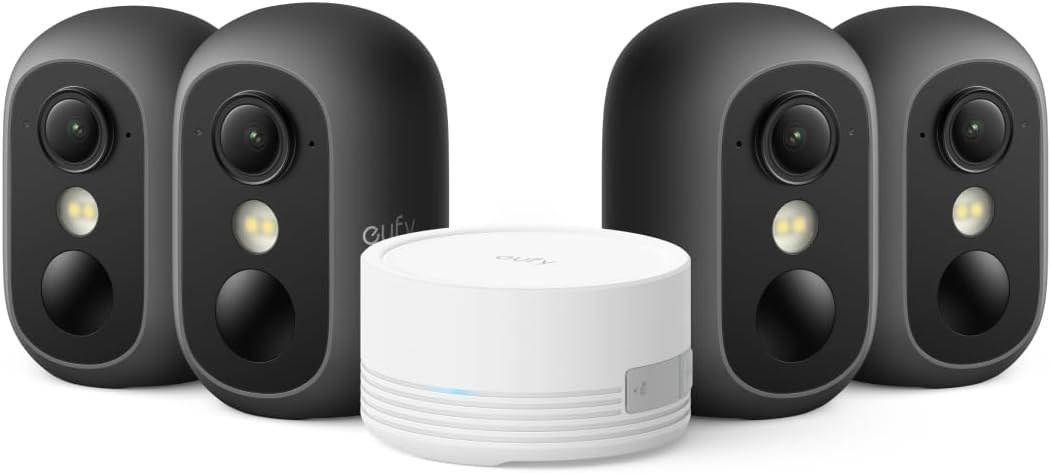
- EufyCam C35 4-Camera Kit — Best Wireless Outdoor Kit. Four fixed battery cameras, magnetic mounts, HomeBase Mini (expandable to 1TB), facial recognition via hub, IP67, and spotlight-free color night vision. View on Amazon
- Eufy Indoor Cam E30 (2-Pack) — Best Indoor Pick. 4K wired pan-and-tilt, on-device people, pet and sound detection, microSD storage (card sold separately), and HomeKit with a 1080p cap. View on Amazon
Reolink RLK16-800D8 (larger properties), ANNKE Wireless NVR Kit (Wi-Fi NVR kit), EufyCam C37 (solar outdoor kit, no purchase link available), and SwitchBot 3K PTZ (best single outdoor camera, with its AI caveat) remain in the full comparison below.
At a Glance
| Product | Best for | Key specs | Link |
|---|---|---|---|
| Eufy Indoor Cam E30 (2-Pack) | Best indoor pick | 4K wired pan-and-tilt, on-device people, pet and sound detection, microSD storage (card sold separately), HomeKit (1080p cap), Alexa, Google Assistant | View on Amazon |
| EufyCam C37 4-Camera Kit | Solar outdoor kit | Four 2K battery cameras, detachable solar panels, HomeBase Mini 64GB built-in (expandable to 1TB), pan up to 320°, 2.4GHz only, no HomeKit | No purchase link available |
| EufyCam C35 4-Camera Kit | Best wireless outdoor kit | Four fixed battery cameras, magnetic mounts, HomeBase Mini (expandable to 1TB), facial recognition via hub, IP67, spotlight-free color night vision | View on Amazon |
| Reolink RLK8-800D4 | Best overall, top pick | Wired PoE, four 4K cameras, 8-channel NVR, 2TB pre-installed (expandable to 16TB), continuous recording, person, vehicle and animal detection | View on Amazon |
| Reolink RLK16-800D8 | Best for larger properties | 16-channel NVR, eight 4K cameras, 4TB pre-installed (expandable to 16TB), continuous recording, person and vehicle detection | View on Amazon |
| ANNKE Wireless NVR Kit | Best Wi-Fi NVR kit | Four dual-lens PTZ cameras (4MP combined view), 10-channel NVR, 1TB hard drive, pan 350° (not 360°), Wi-Fi video, plug-in power | View on Amazon |
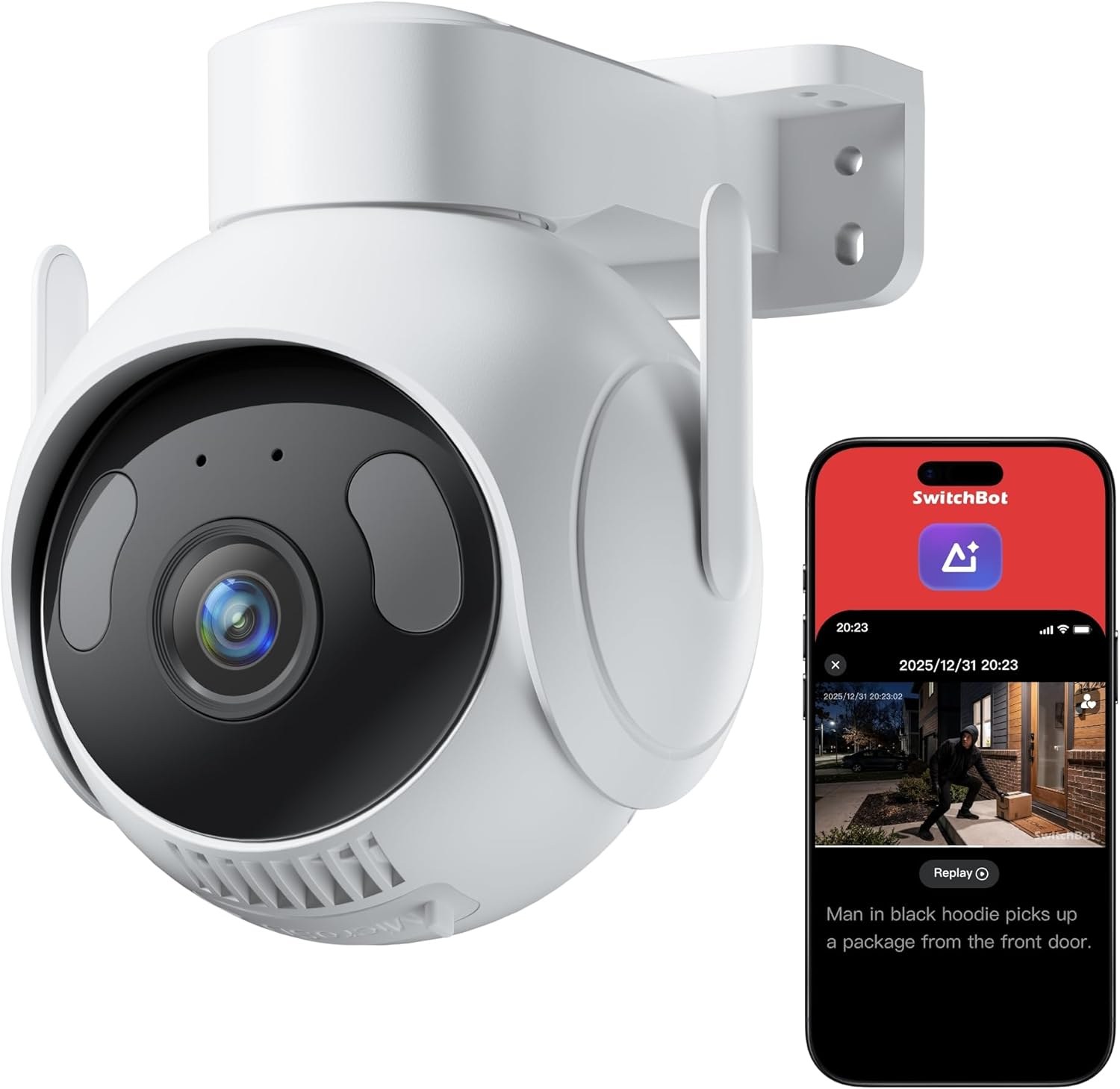
| SwitchBot 3K PTZ | Best single outdoor camera, with a caveat | 3K pan/tilt, microSD up to 512GB, local recording free; AI Video Search, scene alerts and daily reports require a paid plan | View on Amazon |
| Image | Product | Features | Price |
|---|---|---|---|
 | Check Price | ||
 | Check Price | ||
 | Check Price | ||
 | Check Price | ||
 | Check Price | ||
 | Check Price |
When we lined these systems up for our Smart Tech & Gadget Finds video, the question we kept coming back to was not picture quality. It was simpler: with no plan active, what still records, what still detects, and what quietly stops? In our comparison, that question separated the genuine no-subscription systems from the one that only goes part of the way. A security camera without subscription search should start with the same question this review asks: what still works when no plan is active.
Eufy Indoor Cam E30 (2-Pack)

The Eufy Indoor Cam E30 is a wired indoor pan-and-tilt camera that records in 4K, tracks movement automatically, and detects people, pets, and sounds (including crying) on-device. Footage goes to a microSD card — no plan to buy. It works with HomeKit (video capped at 1080p), Alexa, and Google Assistant.
Pros: 4K recording with pan-and-tilt coverage and automatic tracking. People, pet and sound detection, including crying sounds, runs on the device. Full functionality on local microSD storage, with no monthly fee. Works with HomeKit, Alexa and Google Assistant.
Cons: Wired and indoor-only; each camera needs an outlet within reach. The microSD card is sold separately. HomeKit video is capped at 1080p.
Skip it if: you need outdoor coverage, a battery camera, or a system that covers several rooms from one box.
EufyCam C37 4-Camera Kit
EufyCam C37 4-Camera Kit (no purchase link available for this kit — we do not link products we cannot verify). The C37 pairs four white 2K battery cameras with detachable solar panels and a HomeBase Mini hub with 64GB of built-in storage, expandable up to 1TB. Its cameras pan and tilt up to 320°, auto-track, and detect faces, people, vehicles, and pets through the hub. 2.4GHz Wi-Fi only; no HomeKit support.
Pros: Detachable solar panels included, which takes most recharging away. HomeBase Mini storage starts at 64GB and expands to 1TB. Face, people, vehicle and pet detection through the hub, fee-free. Pan-and-tilt cameras with auto-tracking.
Cons: No verified purchase link is available yet, so it carries no link here. 2.4GHz Wi-Fi only, and no HomeKit. It is a 2K kit, not 4K.
Skip it if: you need a linked purchase option today, HomeKit support, or 4K recording.
EufyCam C35 4-Camera Kit

The EufyCam C35 kit takes a different route: four compact black fixed battery cameras with magnetic snap-on mounts. Storage lives on the included HomeBase Mini (expandable to 1TB), enabling facial recognition and cross-camera tracking. The cameras are IP67-rated, have their own microSD slots, and shoot spotlight-free color night vision. A solar panel is compatible but not included.
Pros: Magnetic snap-on mounts make this the simplest outdoor install here. Facial recognition and cross-camera tracking via the hub, fee-free. IP67-rated, with color night vision that needs no spotlight. Each camera also has its own microSD slot.
Cons: Fixed cameras — no pan or tilt, so placement decides coverage. Solar panel is compatible but not included; camera cards are not included either. 2.4GHz Wi-Fi only.
Skip it if: you need pan-and-tilt coverage from a single camera, or you want solar charging included in the box.
Reolink RLK8-800D4
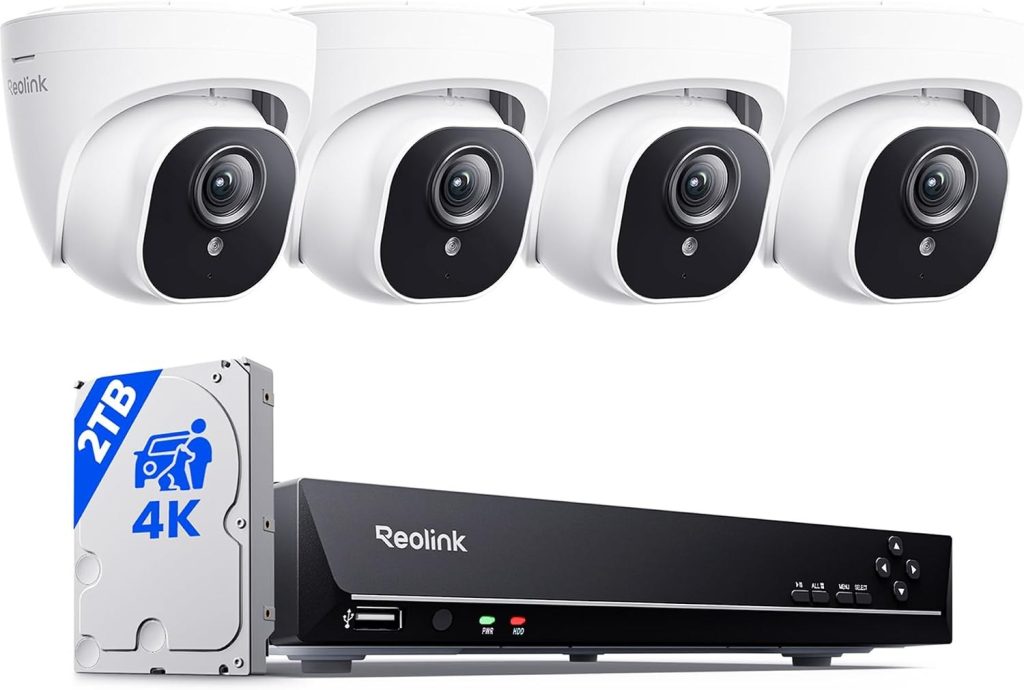
Reolink RLK8-800D4 — our top pick. The Reolink RLK8-800D4 is a wired PoE system: four 4K turret cameras and an 8-channel NVR with a 2TB hard drive pre-installed. It records continuously with person, vehicle, and animal detection, and one Ethernet cable carries power and data to each camera. Storage expands up to 16TB, with room to grow to eight cameras.
Pros: True continuous recording to a 2TB hard drive pre-installed. PoE: one cable per camera carries power and data. Person, vehicle and animal detection, fully local, expandable to 16TB. Room to grow from four cameras to eight.
Cons: Running Ethernet cable is real install work. Wired only — no battery or Wi-Fi flexibility. No monitor in the box; viewing is via the app or your own display.
Skip it if: you rent and cannot run cable, or you only need one or two cameras and want the simplest possible install.
Reolink RLK16-800D8
The RLK16-800D8 scales the same idea up: a 16-channel NVR, eight 4K cameras in the box, and a 4TB hard drive — for larger homes, farms, and small businesses. It keeps the smaller kit’s continuous recording and single-cable PoE install, for properties where eight cameras is the starting point, not the ceiling.
Pros: Eight 4K cameras in the box, on a 16-channel NVR. 4TB hard drive pre-installed, expandable to 16TB total. Continuous local recording with person and vehicle detection, no subscription. Free app remote access and playback.
Cons: Eight cable runs is a bigger install than most homes need. Built for coverage first; the detection list leads with people and vehicles. More system than a small home will use.
Skip it if: you need fewer than four cameras, or you want a wireless install with no cable runs.
ANNKE Wireless NVR Kit

The ANNKE wireless kit uses four dual-lens PTZ cameras on Wi-Fi with plug-in power. Its 10-channel NVR with a 1TB hard drive records around the clock. The cameras pan 350° (not a full 360°), combine two lenses into a 4MP view, and support auto tracking with AI human detection.
Pros: Dual lenses pair a fixed wide view with a pan-and-tilt view. Continuous recording to a 1TB hard drive, on a 10-channel NVR. Auto tracking, presets and AI human detection; dual-band Wi-Fi. No Ethernet runs — video travels over Wi-Fi.
Cons: Pan is 350°, not a full 360°. Each camera still needs a power outlet; “wireless” means the video signal only. Cameras combine into a 4MP view; the 4K figure is the NVR’s capability.
Skip it if: you have no outlet near a camera position, you need a full 360° pan, or you want battery cameras you can place anywhere.
SwitchBot 3K PTZ

The SwitchBot 3K PTZ is a single outdoor pan/tilt camera with 3K resolution, auto tracking, and local recording to a microSD card of up to 512GB at no storage fee. The honest caveat: its AI Video Search, scene alerts, and daily activity reports require a paid subscription (per the listing); core recording does not.
Pros: 3K single-camera simplicity with pan, tilt and auto tracking. Local recording to microSD up to 512GB, free per month. Dual-light night vision and an IP66 outdoor rating. Works with Alexa, Google Assistant, and Home Assistant via RTSP.
Cons: AI Video Search, scene alerts and daily reports sit behind the paid plan. One camera covers one viewpoint at a time. The descriptive AI is the headline feature — and the part that is not free.
Skip it if: the AI search and daily-report features are the reason you want this camera, since those are the parts that require a plan.
What to Know Before You Buy
What “no subscription” actually has to mean
Apply one test before anything else: with no plan active, does the camera still save useful video history, still detect what matters, and still alert you? A camera that only shows a live stream, or that keeps no clips once a trial ends, fails that test even if its box says no subscription is required. In our comparison, six of these systems pass the test in full for recording and core detection. SwitchBot passes it for recording, but not for its descriptive AI layer — and that distinction is the whole reason it is flagged everywhere in this article. Be just as strict with the big subscription brands: on many of their cameras, recording history and smarter detection are exactly what the monthly plan sells. That is the contrast these local-storage systems are built against.
Where the footage lives — and what happens if a camera is taken
Local storage is not one setup. Footage can live on a card inside the camera (E30, SwitchBot), on a hub inside your home (the eufy HomeBase Mini), or on a hard drive in an NVR inside your home (Reolink, ANNKE). The difference matters most on the worst day: if an outdoor camera is stolen or knocked down, a card inside it goes with it, while hub and NVR footage stays inside the house. Hub storage has a second, everyday advantage — clips stored indoors are typically quicker to pull up than clips fetched over Wi-Fi from a card in an outdoor camera. If a camera guards a spot where theft itself is the risk, prefer a system whose recordings live indoors. That not-one-setup point is the honest test in any local storage security camera search: where the footage lives, and what happens to it on the worst day.
Continuous recording vs motion clips: power decides
As a rule of thumb, choose a plug-in camera for any spot where missing the start of an event is not acceptable, and choose a battery or solar camera for easier placement where a triggered clip is good enough. Plug-in cameras — the wired Reolink and ANNKE kits, and the wired E30 — can record continuously because they never have to save power. Battery cameras sleep, wake on motion, and save a clip, which is what makes long battery life possible at all. More frequent recording and tracking use more battery, so a busy driveway will always drain a battery camera faster than a quiet side yard.
Local storage is finite — and cards wear out
Cards and drives fill up and overwrite the oldest footage, so bigger storage means a longer history. Memory cards are often sold separately (the E30; the C35’s camera slots) — budget for one. One more card detail worth knowing: continuous loop recording rewrites the same card over and over, and ordinary consumer cards wear out faster under that workload than cards rated for endurance use. If a camera will record continuously to a card, choose a card built for that workload rather than the cheapest card available. NVR and hub systems avoid this problem by writing to a hard drive or hub storage instead, and they expand much further — up to 1TB on the eufy hubs here, and up to 16TB on the Reolink NVRs.
What happens when the internet or Wi-Fi goes down
Local recording and remote access are two separate functions, and an outage treats them differently. A camera that still has power can usually keep writing to its own card while your internet service is down — but live viewing from your phone and push alerts will normally stop until service returns. There is one exception to watch for: a Wi-Fi camera that must send its video to a separate hub or recorder can also lose recording if the local wireless link itself fails, since the footage has to cross Wi-Fi to reach its storage. Wired PoE cameras connected to a local NVR are the most outage-resistant setup here, because neither power nor video depends on Wi-Fi. And one boundary to be clear about: none of these seven systems is built for a property with no internet connection at all. Remote viewing and alerts for a cabin, barn, or job site without home internet is a different category of product, and it normally needs its own cellular connection.
Local vs cloud: the trade-off stated both ways
Local storage is free, private, and does not need an internet connection to record. Cloud storage, by contrast, normally means a monthly plan and footage held on the manufacturer’s servers — but it has one genuine advantage local storage does not: a copy held off-site survives even if a camera is stolen or damaged at home. Some cameras offer an optional cloud plan purely as backup. That option does not change the verdict here — core recording on every system in this article works with no plan — but if off-site backup matters to you, weigh that protection against the repeating bill and the privacy trade-off of footage leaving your home.
Resolution is not night vision
Do not judge night footage by resolution alone. Resolution counts pixels; it says nothing about how much light each pixel collects. A sensor that packs more pixels into the same physical area can actually gather less light per pixel, so a poorly designed high-resolution camera can look noisier in the dark than a well-designed lower-resolution one. What rescues night footage is light gathering — a wider aperture and a larger sensor — plus how the camera handles darkness: infrared for a greyscale image, a spotlight or dual lights for colour, or, as on the C35, colour night vision that needs no spotlight. When you compare two cameras, read the night-vision approach and the sensor story before you are swayed by the megapixel figure.
The long-run cost question
The honest way to compare these systems with subscription cameras is over several years, not at checkout. A subscription camera’s monthly plan repeats year after year, and it multiplies across every camera on the property — so over the life of a four-camera setup, the repeating bill can grow larger than the hardware itself. A local-storage system asks for one hardware purchase and then nothing per month. That is the whole economic case for this article’s lineup, and it holds even before you count the storage upgrades: a card, a larger hub capacity, or a bigger NVR drive are one-time additions, not a bill that renews.
Smart-home fit and openness
Platform fit deserves its own line in your decision, not an afterthought. The E30 works with HomeKit (with the 1080p cap noted above), Alexa, and Google Assistant; SwitchBot works with Alexa, Google Assistant, and Home Assistant via RTSP. RTSP is worth a sentence of its own: it is an open streaming standard that lets a camera feed third-party recorder software or a home-automation setup instead of locking video inside one manufacturer’s app. If you already run a smart home, or you want your cameras to trigger lights, sirens, or other automations, check platform support and open-streaming support before you buy — and note that some automations that run locally keep working during an internet outage, while cloud-dependent ones do not.
Solar and battery: the sunlight caveat
Solar charging only removes routine charging when the panel gets adequate sunlight. Cloudy stretches draw on the battery buffer, and a camera that records and tracks often will need more sun than one watching a quiet corner. The C37’s detachable panels take most recharging away in reasonable sun, but a shaded mounting spot or a very busy scene changes that picture — so mount solar cameras where they genuinely see the sky, not just where the view looks best.
One camera, or a whole-home system?
Decide the scale before the model. For one or two cameras and zero hassle, a single camera or a small kit is the right shape. For a property-wide system that records everything, all the time, an NVR kit is the straightforward answer, and its channel count is your ceiling: the RLK8-800D4 grows from four cameras to eight, the RLK16-800D8 starts at eight on a 16-channel recorder, and the ANNKE kit records to a 10-channel NVR. Buying a kit with spare channels is cheaper and simpler than replacing a recorder later. One scope note: none of these seven systems is a video doorbell. If porch coverage with a doorbell camera — a visitor at the door, two-way talk at the entrance — is what you need, treat that as a separate purchase decision rather than stretching one of these cameras into a job it was not built for.
How these picks were chosen
In our comparison, a system earned its place only if its core recording and core detection work with no plan active — local storage, live view, playback, and on-device detection, all fee-free. A system whose recording history or core detection required a paid plan would not have qualified, which is why SwitchBot is included only with its AI caveat stated in full rather than smoothed over. Within that rule, the lineup was weighed on storage type and expandability, continuous vs clip recording, install effort (cable runs vs magnetic mounts vs outlets), night-vision approach, and smart-home compatibility, so that indoor rooms, wireless outdoor kits, and full property systems each have a genuine option.
NAS as a Local Storage Option: A Generic Topic
One roundup raises network-attached storage as a local storage option, and the generic version is a topic to understand before you buy, not a claim about any system in this roundup. A network storage box on a home network can hold footage from cameras that support it, keeping recordings inside the home rather than on a card, a hub, or a recorder from one brand. That point is not verified by this review, and no network-storage claim is made here for any lineup system, because this review states no network-storage support for its lineup. The generic instruction is a listing check: ask the listing for your exact model whether it supports network storage at all, and if it does, what setup that support needs. Do not assume network-storage support that the listing does not name. Check the listing before you buy.
Free Cloud Tiers as a Backup Question
One roundup raises free cloud storage tiers as a topic, and the generic version is a backup question only, because this review’s verdict rests on local recording with no plan. Some cameras offer a free cloud tier purely as backup, and that option is worth understanding as a concept: a copy held off-site survives even if a camera is stolen or damaged at home, while footage held only at home does not. That point is not verified by this review as a claim about any lineup system, and no free-tier claim is made here for any system in this roundup. The generic instruction is a listing check: ask the listing for your exact model whether any free cloud tier exists, what it stores, and how long it keeps it. Do not assume a free tier that the listing does not name, and do not judge a local-storage system against a cloud tier its own listing does not offer. Check the listing before you buy.
Remote Access Without a Subscription: A Generic Topic
One roundup raises remote access without a subscription as a topic, and the generic version is a question to carry into any listing, not a claim about any system here. Remote access means viewing live video and clips from a phone away from home, and it is a separate function from local recording — a camera can record locally with no plan while remote access behaves differently. That distinction is not verified by this review as a claim about any lineup system, and no remote-access claim is made here for any system in this roundup. The generic instruction is a listing check: ask the listing for your exact model what remote viewing and alerts do with no plan active, and whether any remote feature needs a plan. Do not assume remote access that the listing does not describe. Check the listing before you buy.
Card Costs and Storage Planning: The Cost Angle
One roundup raises memory-card costs as a planning topic, and the generic version is a cost-planning angle only — this review already covers cards filling up and wearing out, so this section adds the budgeting question, not a new storage claim. Cards are often an added purchase rather than an included one, and a system that records continuously to cards will need replacement cards over its life, so the card budget belongs in the purchase plan rather than as an afterthought. That point is not verified by this review as a claim about any lineup system, and no card-cost figure and no card-life figure are stated here. The generic instruction is a listing check: ask the listing for your exact model whether a card is included, what the listing says about replacement planning, and whether spares belong in the budget. Do not assume an included card that the listing does not name. Check the listing before you buy.
Placement and Installation Guidance: Generic Advice
One roundup raises camera placement and installation as a topic, and the generic version is guidance to work through before ordering, not a claim about any lineup system. Walk the property and mark each viewpoint before you buy: what each camera must see, where its power comes from, how its video reaches its storage, and whether anything blocks the view. A camera that cannot see its target, cannot reach power, or cannot reach its storage is a poor purchase whatever its features. That guidance is generic, not a claim about any system in this roundup, and no placement claim is made here for any lineup product. Work through the viewpoints on your own property before you order, and check the manual for your exact model for its installation guidance.
Two-Way Audio as a Buying Factor
Two roundups raise two-way audio as a buying factor, and the generic version is a listing question only, because this review states no two-way-audio detail for its lineup as a buying factor. Two-way audio means speaking through the camera to someone near it, which matters at an entrance but matters little for a camera watching a yard. That point is not verified by this review, and no two-way-audio claim is made here for any lineup system. The generic instruction is a listing check: ask the listing for your exact model whether two-way audio exists, and if it does, how it works. Do not assume two-way audio that the listing does not name, and do not pay for an entrance feature on a camera that will never guard an entrance. Check the listing before you buy.
App Usability as a Buying Factor
One roundup raises app usability as a buying factor, and the generic version is a question to weigh before you buy, not a claim about any lineup system. The app is where live viewing, playback, alerts, and settings live, so a confusing app makes even a capable system feel difficult, while a clear app makes daily use simple. That point is not verified by this review, and no app-quality claim is made here for any system in this roundup. The generic instruction is a listing and review check: read recent owner feedback about the app for your exact model, and judge whether its layout and alert handling suit how you will actually use it. Do not assume app quality that recent feedback does not support. Check recent feedback before you buy.
Weather Resistance and IP Ratings Explained
One roundup raises weather resistance and rating explanations as a topic, and the generic version is an explainer only — this review names ratings inside its product specs, so this section explains what ratings mean in general, without adding any rating claim about any lineup product. A weather-resistance rating describes, in general terms, how well an enclosure resists dust and water, with stronger protection sitting higher on the scale. That explanation is generic knowledge, not a claim about any system here, and no rating is stated here for any lineup product. The generic instruction is a listing check: ask the listing for your exact model what rating it claims, and judge that rating against where the camera will actually sit — sheltered under eaves is a kinder life than fully exposed to driving rain. Do not assume a rating that the listing does not claim. Check the listing before you buy.
What Subscriptions Usually Lock Behind a Plan
Two roundups raise what subscriptions lock away as a topic, and the generic version is a framing question only, without figures and without brand names. On subscription cameras in general, the monthly plan commonly gates video history, smarter detection, and extra features, while basic live viewing may stay free — so the question to ask of any camera is which parts of the job need a plan and which parts work without one. That framing is not verified by this review as a claim about any lineup system, and no locked-feature claim is made here for any system in this roundup. The generic instruction is a listing check: ask the listing for your exact model which features need a plan, if any, and which work with no plan active. Do not assume a feature is free because the box says no subscription, and do not assume it is locked because another brand locks it. Check the listing before you buy.
Motion Zones and False-Alarm Tuning: Generic Guidance
One roundup raises motion detection zones and false-alarm tuning as a topic, and the generic version is guidance to use after install, not a claim about any lineup system. A motion zone lets a camera watch one part of its view and ignore the rest, which cuts alerts from passing traffic, swaying branches, and other movement that is not a real event. That guidance is generic, not a claim about any system in this roundup, and no motion-zone claim is made here for any lineup product. The generic instruction is a listing and manual check: ask the listing for your exact model whether zones exist, and if they do, set them during the first days rather than living with noisy alerts. Do not assume zone support that the listing does not name. Check the listing and manual before you rely on it.
Professional Monitoring Versus Self-Monitoring: A Generic Distinction
One roundup raises professional monitoring versus self-monitoring as a topic, and the generic version is a distinction to understand before you buy, not a claim about any system here. Self-monitoring means alerts go to you and you decide what to do; professional monitoring means alerts go to a monitoring service that can respond on your behalf. That distinction is generic, not a claim about any lineup system, and no monitoring claim is made here for any system in this roundup — the systems here are presented as local-storage systems, not as monitored services. The generic instruction is a listing check: ask the listing for your exact model whether any monitoring service is offered at all, and if it is, what it covers. Do not assume monitoring that the listing does not offer. Check the listing before you buy.
Warranty and Money-Back Terms as Listing Checks
One roundup raises warranty and money-back terms as a topic, and the generic version is a set of listing questions only, with no figures stated here. Warranty length, what the warranty covers, and whether a money-back return window exists all belong in the purchase decision, because a camera that fails early is only as good as the support behind it. That point is not verified by this review, and no warranty claim and no return claim are made here for any lineup system. The generic instruction is a listing check: ask the listing for your exact model what warranty it offers, what that warranty covers, and what return terms apply. Do not assume warranty or return terms that the listing does not state. Check the listing before you buy.
Privacy, Evidence, and Local Rules: A Generic Topic
One roundup raises privacy and evidence implications of storage location as a topic, and the generic version is a topic to weigh before you buy, not legal advice and not a claim about any lineup system. Footage stored at home stays in your home, while footage stored elsewhere leaves it — and rules about recording, especially where cameras capture neighbours or public areas, vary by place. That point is not verified by this review, and no legal claim is made here for any system in this roundup. The generic instruction is a local-rules check: before installing, check the rules that apply where you live for camera placement and recording, and position cameras to cover your own property rather than your neighbours. Do not treat this section as legal advice. Check your local rules before you install.
DVR Versus NVR: A Generic Distinction
One roundup raises the DVR-versus-NVR distinction as a topic, and the generic version is an explainer only, not a claim about any lineup system. In general terms, a DVR works with analogue cameras over coaxial cable, while an NVR works with network cameras over network cable or Wi-Fi — and the recorder type must match the cameras it serves. That explanation is generic knowledge, not a claim about any system here, and no recorder-type claim is made here for any lineup product beyond what this review already states about its own kits. The generic instruction is a listing check: ask the listing for your exact model what recorder type it uses, and confirm the cameras and recorder in a kit belong together. Do not mix recorder types that the listing does not pair. Check the listing before you buy.
How to Tell Whether a Camera Needs a Subscription: A Generic Checklist
One roundup raises a subscription-need checklist as a topic, and the generic version is a set of questions suggested by competitor roundups, not a restatement of this review’s own test and not a claim about any lineup system. Ask whether recording history works with no plan active. Ask whether detection and alerts work with no plan active. Ask whether playback works with no plan active. Ask whether any feature that matters to you sits behind a plan, and whether a trial changes the deal later. Those questions are attributed to competitor roundups, not verified by this review, and no checklist result is claimed here for any system in this roundup. Work through the questions against the listing for your exact model before you buy, and do not trust a no-subscription label alone — trust what the listing says works with no plan.
The Big-Brand Free-Tier Landscape in General Terms
Two roundups describe the free-tier landscape of the big subscription brands in detail, and the generic version is a landscape note only, without naming any brand and without brand-specific claims. In general terms, the big subscription brands place most recording behind plans, while some offer limited free history or local recording through a hub — but the details differ by brand and by model, and they change over time. That landscape note is not verified by this review, and no brand-specific free-tier claim is made here for any brand or any lineup system. The generic instruction is a listing check: for any camera outside this roundup, ask its listing what works with no plan, rather than assuming a brand’s reputation applies to every model it sells. Check the listing for your exact model before you buy.
Who It’s For
For one or two cameras and zero hassle, start with the E30 indoors or the C35 kit outdoors. For a property-wide system that records everything, all the time, with no subscription, a Reolink NVR kit is the straightforward answer — the 8-channel version is the one most homes should pick. Choose ANNKE if you want NVR recording without Ethernet runs, and SwitchBot only with its AI caveat understood. Choose the C37 only if its solar pan-and-tilt kit fits your property and you accept that it currently carries no purchase link here. That no-Ethernet-runs option is the honest test in any wireless security camera no subscription search: recording that does not depend on cable runs.
FAQ
Which of these cameras record with no monthly fee?
All of them record locally with no fee for recording or playback — eufy to a card or HomeBase, Reolink and ANNKE to an NVR hard drive, SwitchBot to microSD. The one exception is SwitchBot’s descriptive AI layer: AI Video Search, scene alerts and daily reports require its paid plan.
Can a security camera work with no monthly fee at all?
Yes, provided it stores footage locally — on a card, a hub, or an NVR — and its core detection runs on the device or the hub rather than in the cloud. That is the test this article applies: live view, recording, playback, and core detection all have to work with no plan. A camera that only live-streams without a plan, or that keeps no video history without one, does not meet it.
What is the difference between local storage and cloud storage?
Local storage saves footage to a card, hub, or hard drive inside your home. It is free, private, and does not need an internet connection to record. Cloud storage saves footage to the manufacturer’s servers, normally for a monthly plan; it is reachable from anywhere and survives camera theft or damage, but it costs every month and moves your footage off your property.
What happens when local storage fills up?
The oldest footage is overwritten as new footage arrives. Storage size decides your history: an NVR hard drive holds far more than a small card, and the hub and NVR systems here expand up to 1TB or 16TB depending on the model.
Can these cameras record continuously, or only save motion clips?
It depends on power. The plug-in systems — the Reolink and ANNKE NVR kits and the wired E30 — can record continuously. Battery and solar cameras sleep, wake on motion, and save clips, because continuous recording would drain a battery far too fast. If catching the seconds before an alert matters to you, choose a plug-in system.
Do these cameras keep recording if the Wi-Fi goes down?
Local recording can continue if the camera still has power and its local link to its storage is intact — a card camera writing to its own card, or a wired PoE camera writing to its NVR. Remote viewing and push alerts stop until internet service returns, and a Wi-Fi camera that must reach a separate hub or recorder can lose recording if the local wireless link fails.
Do no-subscription cameras still have AI alerts?
Yes, where detection runs on the device or the hub. On-device detection is free on the eufy and Reolink systems here, and ANNKE’s AI human detection runs on its kit. The exception proves the rule: on SwitchBot, core recording is free, but the descriptive AI features — AI Video Search, scene alerts, and daily reports — sit behind the paid plan. Free recording does not automatically mean every AI feature is free, so check the fine print model by model.
Is PoE better than Wi-Fi for security cameras?
It is a trade. PoE (Reolink) means cable work at install, then continuous recording with no batteries and no Wi-Fi dropouts. Wi-Fi and battery models install far more easily but depend on your network, and battery cameras need charging or solar. Choose based on whether you would rather do the work once or keep the install simple.
Are subscription-free cameras as capable as the big subscription brands?
For the core job — recording, detection, and playback with no monthly bill — the systems here match the job the subscription brands sell. Where the big subscription brands still lead is around the edges: more polished apps, professional monitoring options, and broader ecosystems. You are trading that polish and those services for a system whose footage stays in your home and whose bill stops at the hardware.
Does the EufyCam C37 kit have a purchase link?
No. No verified affiliate link is available for the C37 kit, and we never invent one, so it appears here for comparison only. The C35 kit is the linked eufy outdoor option.
Can a NAS hold camera footage?
That depends on the listing, so ask the listing for your exact model whether it supports network storage at all, and if it does, what setup that support needs. One roundup raises network-attached storage as a local storage option, and that point is not verified by this review — no network-storage claim is made here for any lineup system. Do not assume network-storage support that the listing does not name. Check the listing before you buy.
Do any cameras offer free cloud storage?
Some cameras offer a free cloud tier purely as backup, as a concept worth understanding: a copy held off-site survives even if a camera is stolen or damaged at home. That point is not verified by this review, and no free-tier claim is made here for any lineup system. Check the listing for your exact model for whether any free cloud tier exists, what it stores, and how long it keeps it. Do not assume a free tier that the listing does not name.
Can I view cameras remotely without a subscription?
That depends on the listing, so ask the listing for your exact model what remote viewing and alerts do with no plan active, and whether any remote feature needs a plan. Remote access is a separate function from local recording, and one roundup raises it as a topic — but that point is not verified by this review, and no remote-access claim is made here for any lineup system. Do not assume remote access that the listing does not describe. Check the listing before you buy.
What should I budget for memory cards?
Cards are often an added purchase rather than an included one, and a system that records continuously to cards will need replacement cards over its life, so the card budget belongs in the purchase plan. That planning point is not verified by this review, and no card-cost figure and no card-life figure are stated here. Check the listing for your exact model for whether a card is included and what replacement planning it suggests. Do not assume an included card that the listing does not name.
Where should I place cameras?
Walk the property and mark each viewpoint before you buy: what each camera must see, where its power comes from, how its video reaches its storage, and whether anything blocks the view. That guidance is generic, not a claim about any lineup system, and no placement claim is made here for any system in this roundup. Work through the viewpoints on your own property before you order, and check the manual for your exact model for its installation guidance.
Should I check for two-way audio?
That depends on where the camera will sit. Two-way audio means speaking through the camera to someone near it, which matters at an entrance but matters little for a camera watching a yard. That point is not verified by this review, and no two-way-audio claim is made here for any lineup system. Check the listing for your exact model for whether two-way audio exists. Do not assume it where the listing does not name it.
How much does the app matter?
A lot in daily use. The app is where live viewing, playback, alerts, and settings live, so a confusing app makes even a capable system feel difficult, while a clear app makes daily use simple. That point is not verified by this review, and no app-quality claim is made here for any lineup system. Read recent owner feedback about the app for your exact model before you buy, and judge whether its layout and alert handling suit how you will actually use it.
What does a weather-resistance rating mean?
In general terms, a weather-resistance rating describes how well an enclosure resists dust and water, with stronger protection sitting higher on the scale. That explanation is generic knowledge, not a claim about any lineup product, and no rating is stated here for any system in this roundup. Check the listing for your exact model for what rating it claims, and judge that rating against where the camera will actually sit. Do not assume a rating that the listing does not claim.
What do subscriptions usually lock away?
In general terms, the monthly plan commonly gates video history, smarter detection, and extra features, while basic live viewing may stay free — so the question to ask of any camera is which parts of the job need a plan and which parts work without one. That framing is not verified by this review, and no locked-feature claim is made here for any lineup system. Check the listing for your exact model for which features need a plan, if any. Do not assume a feature is free because the box says no subscription.
Can I tune motion zones to cut false alarms?
That depends on the listing. A motion zone lets a camera watch one part of its view and ignore the rest, which cuts alerts from passing traffic, swaying branches, and other movement that is not a real event. That guidance is generic, not a claim about any lineup system, and no motion-zone claim is made here for any system in this roundup. Check the listing for your exact model for whether zones exist, and set them during the first days if they do.
What is the difference between professional and self-monitoring?
Self-monitoring means alerts go to you and you decide what to do; professional monitoring means alerts go to a monitoring service that can respond on your behalf. That distinction is generic, not a claim about any lineup system, and no monitoring claim is made here for any system in this roundup. Check the listing for your exact model for whether any monitoring service is offered at all. Do not assume monitoring that the listing does not offer.
What should I check about warranty and returns?
Warranty length, what the warranty covers, and whether a money-back return window exists all belong in the purchase decision, because a camera that fails early is only as good as the support behind it. That point is not verified by this review, and no warranty claim and no return claim are made here for any lineup system. Check the listing for your exact model for what warranty it offers, what that warranty covers, and what return terms apply.
Who can access footage stored at home?
Footage stored at home stays in your home, while footage stored elsewhere leaves it — and rules about recording, especially where cameras capture neighbours or public areas, vary by place. That point is not verified by this review, and no legal claim is made here. Before installing, check the rules that apply where you live for camera placement and recording, and position cameras to cover your own property rather than your neighbours. Do not treat this answer as legal advice.
What is the difference between a DVR and an NVR?
In general terms, a DVR works with analogue cameras over coaxial cable, while an NVR works with network cameras over network cable or Wi-Fi — and the recorder type must match the cameras it serves. That explanation is generic knowledge, not a claim about any lineup product. Check the listing for your exact model for what recorder type it uses, and confirm the cameras and recorder in a kit belong together.
How do I tell if a camera needs a subscription?
Work through questions suggested by competitor roundups: does recording history work with no plan active, do detection and alerts work with no plan active, does playback work with no plan active, and does any feature that matters to you sit behind a plan or change when a trial ends. Those questions are attributed, not verified by this review, and no checklist result is claimed here for any lineup system. Work through them against the listing for your exact model before you buy, and do not trust a no-subscription label alone.
Do big subscription brands offer anything free?
In general terms, the big subscription brands place most recording behind plans, while some offer limited free history or local recording through a hub — but the details differ by brand and by model, and they change over time. That landscape note is not verified by this review, and no brand-specific free-tier claim is made here. For any camera outside this roundup, check its listing for what works with no plan, rather than assuming a brand’s reputation applies to every model it sells.
How the New Sections Were Chosen
This update separates buying guidance from product verdicts by lining the new sections up against the article’s existing coverage: every new section covers a topic the article did not already cover, and none of them changes a product section, a ranking, or the verdict. No hands-on test results, no scores, and no measured figures are claimed here, because none were run for this review. Competitor-derived points are attributed and framed as listing checks, so check the current listing for the exact model you would buy.
Final Verdict
Start with the Reolink RLK8-800D4 if you want the no-subscription promise kept in full: continuous recording, smart detection, and a hard drive in your own home, with room to grow. It stood out when we lined these systems up in our comparison because nothing about it changes when a trial ends — there is no trial. Take the C35 for outdoor coverage without cable work, the E30 for simple indoor coverage, and the RLK16 for larger properties. Read the SwitchBot section twice: a good camera, and the one honest exception in a roundup about paying nothing per month.
Affiliate Disclosure: This article contains Amazon affiliate links. As an Amazon Associate, Smart Tech & Gadget Finds earns from qualifying purchases at no extra cost to you. #ad