Best Baby Monitors 2026: Smart WiFi vs No-WiFi Compared
Best Baby Monitors 2026
The Owlet Dream Duo Gen 3 is the best baby monitor for most families who want a full smart system, pairing a Dream Sock wearable with a 2K camera in one app. Families who want sleep tracking without anything electronic on the baby should look at the Nanit Pro, while the HelloBaby HB6560 is the best no-WiFi value pick, the Momcozy BM03 leads on battery and range, the Momcozy BM04 is the pick for two rooms, and the HelloBaby HB6081 has the clearest no-WiFi camera in this comparison.
The first decision in buying a baby monitor is not the brand — it is the philosophy. Smart WiFi monitors give you apps, sleep data and wearables. No-WiFi monitors give you a dedicated parent screen, a private local signal and nothing to subscribe to. We compared six of the best for 2026 across both camps, with the subscription fine print most roundups skip. One honest note up front: no monitor is a medical device, and none can guarantee a baby’s safety. What they can do is help you watch, listen and respond — pick the system that fits how your family actually lives.
Key Takeaways
- Start with the philosophy, not the camera: WiFi systems trade a phone app and sleep data for subscriptions and setup, while no-WiFi systems trade remote viewing for privacy and simplicity.
- Two of the six charge for their best features after purchase: Nanit’s Insights plan once the included trial ends, and Owlet’s deeper sleep insights in the optional Owlet360 tier.
- The three no-WiFi monitors have no subscriptions at all, ever, and the BM04 is the exception among smart models — its app is fee-free per the listing.
- Headline range figures are measured in open space. Walls, floors and appliances cut real in-home range, so test the signal at the far end of your house during the return window.
- No monitor here is a medical device. These systems help you watch, listen and respond.
- Two rooms? The Momcozy BM04, with two cameras and a split screen, whose app asks for no fee.
Top 3 Picks
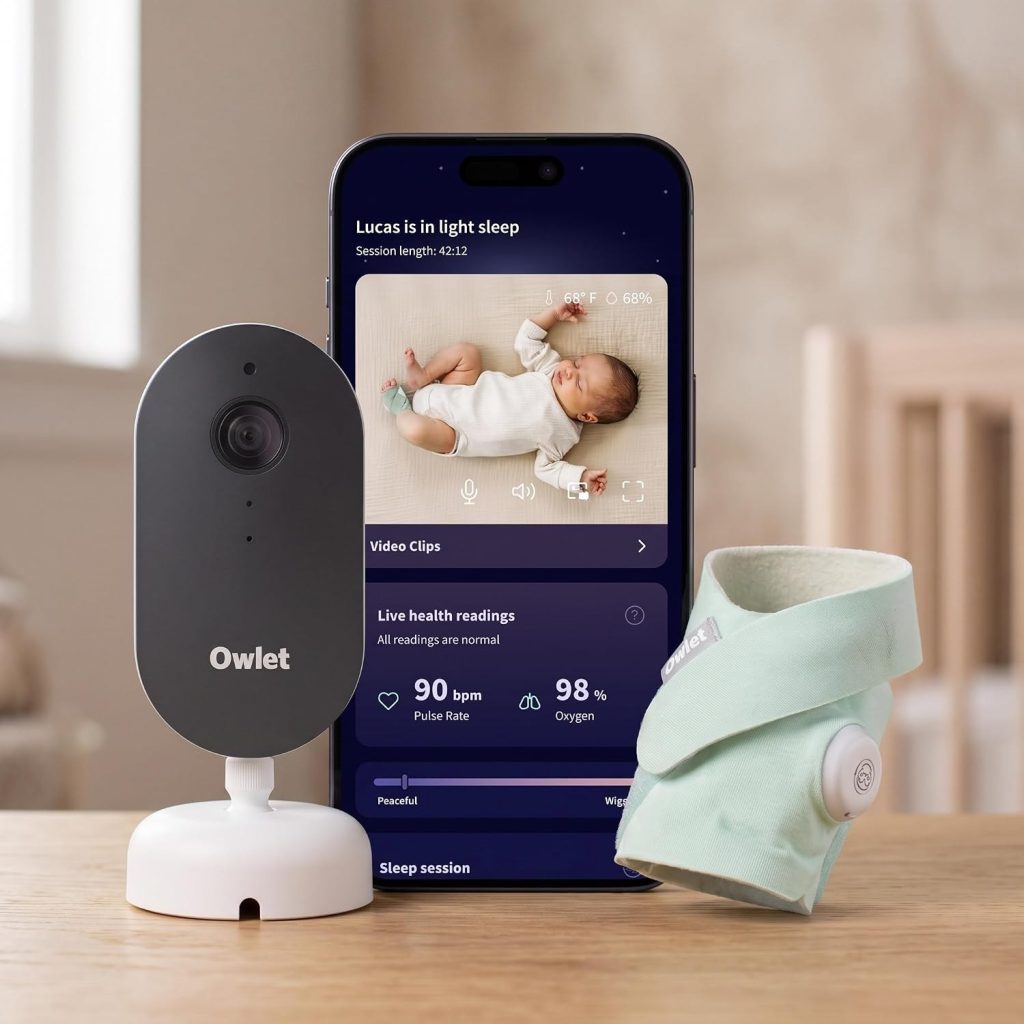
- Owlet Dream Duo Gen 3 — Best Smart System. Dream Sock wearable plus 2K camera in one app; tracks pulse rate, oxygen level and sleep, with Predictive Sleep suggestions. The Dream Sock is FDA-cleared, and there is no parent screen.
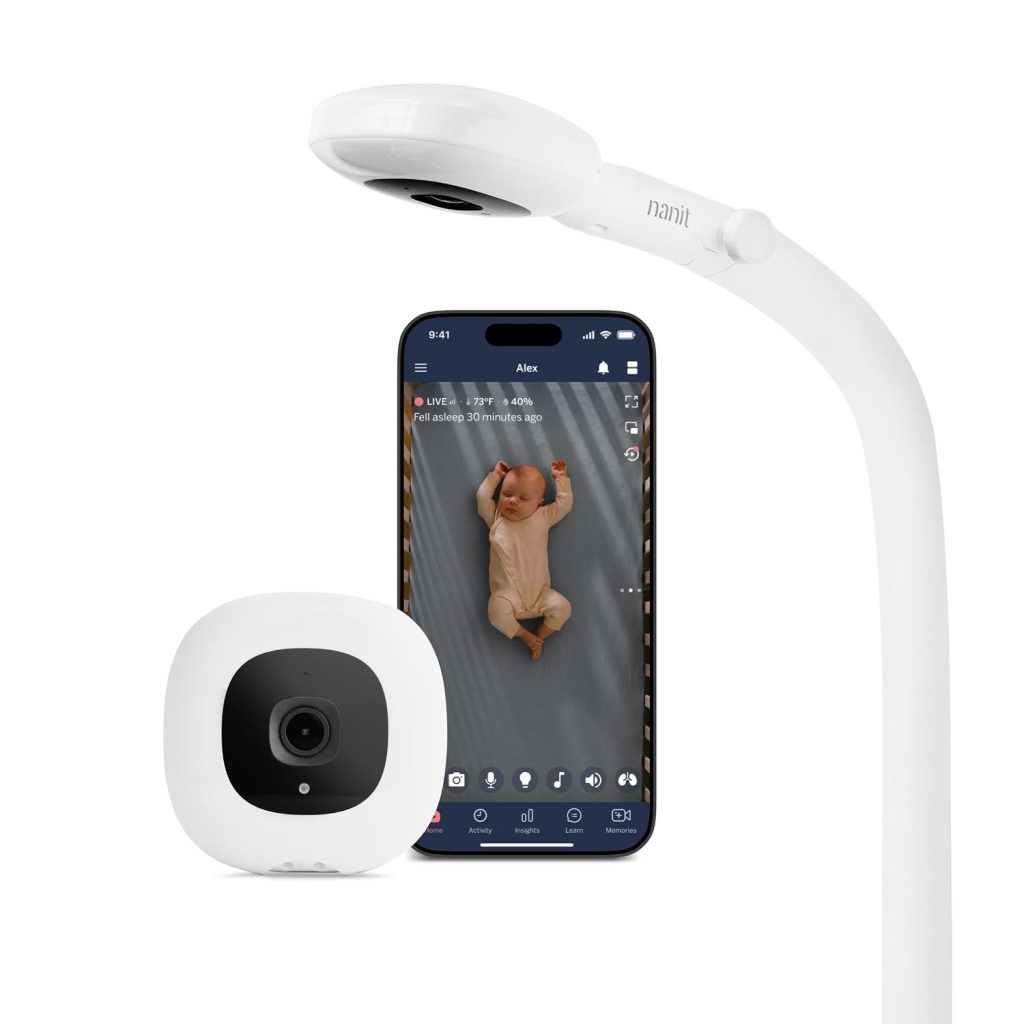
- Nanit Pro — Best Sleep Tracking Without a Wearable. 1080p WiFi camera with sensor-free breathing motion monitoring via Breathing Wear, plus sleep tracking, cry detection, and temperature and humidity sensing. Count the Insights plan in from the start, once the included trial ends.
- HelloBaby HB6560 — Best No-WiFi Value. 6-inch IPS parent screen, private FHSS signal with no WiFi and no app, pan/tilt/zoom, 1000 ft range, up to 30-hour battery, VOX, and two-way talk.
Momcozy BM03 (battery and range), Momcozy BM04 (two rooms), and HelloBaby HB6081 (clearest no-WiFi camera) remain in the full comparison below.
Comparison Table
| Product | Best For | Connection | Screen | Key Feature | Subscription |
|---|---|---|---|---|---|
| Owlet Dream Duo Gen 3 | Best smart system | WiFi app | Phone only | Dream Sock plus 2K camera; pulse, oxygen and sleep tracking | Deeper insights in optional Owlet360 tier |
| Nanit Pro | Sleep tracking, no wearable | WiFi app | Phone only | Sensor-free breathing motion via Breathing Wear; overhead view | Insights plan after trial |
| HelloBaby HB6560 | Best no-WiFi value | FHSS, no WiFi | 6-inch IPS | Pan/tilt/zoom; 1000 ft range; up to 30-hour battery | None |
| Momcozy BM03 | Best battery and range | No WiFi | 5.5-inch 1080P | 5800mAh battery; 1640 ft range; local record and rewind | None |
| Momcozy BM04 | Best for two rooms | WiFi plus parent screen | 5-inch 1080P split screen | Two cameras; sharing for up to 20 family members | App fee-free per listing |
| HelloBaby HB6081 | Clearest no-WiFi camera | FHSS, no WiFi | 5.5-inch HD | 1080P camera; camera night light; split screen for up to four cameras | None |
| Image | Product | Features | Price |
|---|---|---|---|
 | Check Price | ||
 | Check Price | ||
 | Check Price | ||
| Check Price | ||
| Check Price |
1. Owlet Dream Duo Gen 3 — Best Smart System
Owlet Dream Duo Gen 3
The Owlet Dream Duo pairs the Dream Sock wearable with a 2K camera in one app, tracking pulse rate, oxygen level and sleep, with Predictive Sleep suggestions. Stated precisely:…
The Owlet Dream Duo pairs the Dream Sock wearable with a 2K camera in one app, tracking pulse rate, oxygen level and sleep, with Predictive Sleep suggestions. Stated precisely: the Dream Sock is FDA-cleared — that wording belongs to the sock, not the camera or the system as a whole. There is no parent screen; your phone is the monitor, and the deeper insights live in the optional paid Owlet360 tier.
The Owlet is the pick for data-curious parents who want the fullest picture of their baby’s night. The sock and camera together give you readings beside the video in a single app, and the 2K camera is the sharpest in this roundup. That combination is also the trade: you accept a wearable on the baby, a phone kept on monitor duty, and a paid tier for the deepest insights. If any of those three bothers you, the no-WiFi picks below ask far less of you.
Pros: Sock and 2K camera in one app; pulse, oxygen and sleep tracking beside the video; the Dream Sock is FDA-cleared, stated exactly as Owlet states it; Predictive Sleep suggestions built on the tracked data; the sharpest camera in this roundup, at 2K.
Cons: No parent screen — your phone is the monitor, full time; deeper sleep insights sit in the optional paid Owlet360 tier; WiFi and app based, so more setup than the no-WiFi picks.
2. Nanit Pro — Best Sleep Tracking Without a Wearable
The Nanit Pro is a 1080p WiFi camera with sensor-free breathing motion monitoring through patterned Breathing Wear — nothing electronic worn on the baby. Its floor stand adjusts up to 67 inches for an overhead, birds-eye crib view. Sleep tracking, cry detection and temperature and humidity sensing round it out. The catch: the smart analytics need the Insights subscription after the included trial.
Nanit is the answer for parents who want the data but not a wearable. The overhead angle is genuinely different from the low side-angle most cameras settle for: you see the whole crib, and the patterned Breathing Wear lets the camera read breathing motion without electronics on the baby. The honest cost is the subscription conversation. The live video keeps working without a plan, but the sleep analytics — the marquee reason to buy a Nanit — sit behind Insights once the trial ends. Count that plan in from the start, and judge the Nanit on its total cost over the time you will use it, not on the camera alone.
Pros: Breathing motion monitoring with nothing electronic worn on the baby; birds-eye overhead view, with the stand adjusting up to 67 inches; sleep tracking, cry detection and temperature and humidity sensing; the data-rich pick for parents who do not want a wearable.
Cons: Smart analytics need the Insights plan after the included trial; your phone is the screen, as with the Owlet; its headline feature depends on WiFi and the Breathing Wear pattern.
3. HelloBaby HB6560 — Best No-WiFi Value
The HelloBaby HB6560 offers a big 6-inch IPS parent screen (178-degree viewing angle) and a private FHSS signal — no WiFi, no app. The camera pans, tilts and zooms, range is rated at 1000 ft, and the battery runs up to 30 hours in ECO mode (16 hours screen-on), with VOX and two-way talk. In our comparison, this was the one we kept pointing at for grandparents and travel: switch it on and it works.
The HB6560 is the value sweet spot of the no-WiFi camp. Its screen is the biggest here, and the private FHSS link means there is no internet-facing surface for a stranger to reach and no account to manage. The trade is the standard no-WiFi one: no phone viewing and no sleep analytics. Note too that the 1000 ft range is a headline rating measured in open space; walls and floors shorten real range, so test it at the far end of your home during the return window. For most homes, a monitor that covers the whole house with room to spare is what matters, and the HB6560 does that job with the least fuss of any pick here.
Pros: Biggest parent screen here, at 6 inches, on a private FHSS signal; no WiFi, no app, no subscription — ever; pan/tilt/zoom camera with VOX and two-way talk; up to 30-hour battery in ECO mode.
Cons: No phone viewing and no sleep analytics; the 1000 ft range is a headline rating, and walls and floors shorten real range; camera resolution sits below the 1080P no-WiFi models.
4. Momcozy BM03 — Best Battery and Range
The Momcozy BM03 has a 5.5-inch 1080P screen, no WiFi, a 5800mAh battery rated up to 72 hours in regular mode (and up to 120 hours in ECO standby, per the listing — standby is not screen-on use), and a 1640 ft range rating. It records locally with a rewind function, and the 32GB SD card for that is included in the box.
The BM03 is the range-and-battery champion of this comparison, and the local recording sets it apart from the other no-WiFi picks. Being able to rewind and see what happened before you reached the screen is a genuinely useful feature for parents who want to know whether a wake-up was a brief stir or the start of a longer stretch. The battery figures need the same honest reading as every monitor’s: the 120-hour figure is ECO standby, not screen-on monitoring, so judge it on the regular-mode rating and on keeping the parent unit docked overnight. Like every no-WiFi model here, it offers no app or phone check-ins and no sleep analytics — by design.
Pros: Longest battery ratings here — up to 72 hours in regular mode; local record-and-rewind, with the 32GB SD card included; sharp 1080P screen and the longest range rating, at 1640 ft; no WiFi, no app, no subscription.
Cons: The 120-hour figure is ECO standby, not screen-on monitoring; no app or phone check-ins, by design; no sleep analytics or trend data, like every no-WiFi model here.
5. Momcozy BM04 — Best for Two Rooms
The Momcozy BM04 bridges the two camps: WiFi with two cameras, a 5-inch 1080P split screen, a 5000mAh battery and 960 ft range, with motion and cry detection. Unusually for a smart monitor, the Momcozy app requires no fee, and sharing supports up to 20 family members — two rooms covered, with a dedicated screen at home and no subscription conversation.
The BM04 is the hybrid answer in this lineup, and it is the one to buy if your household has two rooms to watch. Two cameras and a split-screen parent unit come in the box, so you can see both rooms at once without swapping feeds, and the app adds phone check-ins and sharing for grandparents or caregivers without a fee. The trade-offs are real but manageable: it is WiFi-based, so families who want zero network involvement should pick a no-WiFi model, and its 960 ft range rating is the shortest here — still ample for most homes, but worth testing at your farthest corner. Setup is also a step up from a single no-WiFi unit, since you are placing two cameras instead of one.
Pros: Two cameras and a split-screen parent unit in the box; the app requires no fee — rare among smart monitors; sharing for up to 20 family members, plus a dedicated screen; motion and cry detection built in.
Cons: WiFi-based; zero-network families should pick a no-WiFi model; the 960 ft range rating is the shortest here; more setup than a single no-WiFi unit.
6. HelloBaby HB6081 — Clearest No-WiFi Camera
The HelloBaby HB6081 pairs a 5.5-inch HD screen with a 1080P camera — sharper than most no-WiFi rivals — plus FHSS privacy, a 4000mAh battery, 1000 ft range and pan/tilt/zoom. The camera has a night light, and the split screen supports up to four cameras, which gives a simple system real room to grow.
The HB6081 is the pick for no-WiFi buyers who care most about picture clarity. The 1080P camera is the clearest picture in the no-WiFi camp here, and the split-screen support for up to four cameras means the system can grow with the family — a second room or a playroom later, without replacing the parent unit. The honest trade-offs: the 4000mAh battery is the smallest here, so plan to keep the parent unit docked, and the screen is HD while the camera is 1080P, so some of that sharpness is headroom rather than what you see on the parent unit. As with every no-WiFi pick, there is no phone viewing or analytics.
Pros: 1080P camera — the clearest picture in the no-WiFi camp; private FHSS signal; no WiFi, app or subscription; camera night light, and split-screen support for up to four cameras; pan/tilt/zoom from the parent unit.
Cons: The 4000mAh battery is the smallest here; no phone viewing or analytics — the standard no-WiFi trade; the screen is HD while the camera is 1080P, so some sharpness is headroom.
Buying Guide: How to Choose the Best Baby Monitor
Start with the philosophy, not the camera
The split that matters most is not camera resolution. It is what each system asks of you after the box is open: a subscription, a phone kept on monitor duty, or nothing at all. Data-curious parents who will actually open sleep trends every morning get real value from a WiFi system. Parents who mostly want to glance at a screen and confirm the baby is asleep get more from a dedicated parent unit. Neither camp is wrong — but buying the wrong type is how you end up either paying monthly for data you never open or lying awake because the monitor will not tell you enough.
WiFi, no-WiFi, or hybrid: the four types
Local video monitors link the camera straight to a handheld parent unit over a private radio signal: private, simple, and working during internet outages, but with no viewing from outside the home. WiFi app cameras stream to your phone, so you can check in from anywhere and share the feed with a caregiver, at the cost of needing reliable internet and an account. Hybrids, like the BM04 here, give you a local parent screen plus optional app access, with a fallback when WiFi drops. Wearables and sensor pads — the Owlet sock, the Nanit Breathing Wear — add movement, pulse or oxygen readings on top of video. Treat any alert as an extra, never as a replacement for a safe sleep space.
Subscriptions: read what is free and what is paid
Two of the six here charge for their best features after you have bought the hardware. Nanit’s Insights plan covers the smart analytics once the included trial ends, and Owlet’s deeper sleep insights sit in the optional Owlet360 tier. The BM04 is the exception among smart models — its app is fee-free per the listing — and the three no-WiFi monitors have no subscriptions at all, ever. Before you buy any smart monitor, check exactly which features work without a plan: live viewing is often free, while saved video history, sleep reports and trend analytics are the parts that typically sit behind a paid tier. Add a year or two of fees to the camera cost to compare honestly.
Range: the number on the box vs the number you will get
Nearly every no-WiFi monitor advertises a four-figure range, and nearly every one of those figures is measured in open space with clear line of sight. Radio waves get absorbed and reflected by drywall, brick, plumbing, appliances and studs, so reliable in-home coverage is always lower than the headline. The lesson is not that these monitors are bad — it is that the honest number for a normal two-story house is “comfortably covers the whole home,” and the headline number is a best case you will never see indoors. Test the signal at the far end of your house during the return window, and in a large or multistory home, favour the longest range rating here, the BM03’s 1640 ft.
Battery: screen-on hours are the honest number
Parent units list hours of screen time, and manufacturers often headline a standby or ECO figure alongside it. Treat standby figures as what they are: the unit sitting idle, not showing video. The number that matters for overnight use is screen-on time, or the ECO-mode figure with the screen waking on sound — the HB6560’s up to 30 hours in ECO mode, for example, against 16 hours screen-on. If your parent unit has a shorter battery, plan to keep it on its charger overnight, and treat the battery as a “carry it to the kitchen” convenience rather than an all-night-off-charger feature.
Night vision, two-way talk, and the features that actually matter
Most baby monitor cameras now include infrared night vision, two-way talk and a room temperature reading. Night vision quality matters more than camera resolution in practice, because most monitoring happens in a dark nursery — check whether the camera uses infrared with no visible red glow, which some parents prefer. Two-way talk lets you soothe without entering the room. Pan, tilt and zoom matter once the baby starts moving around the crib, and a camera night light, like the HB6081’s, is a small comfort feature that parents of light sleepers appreciate. Lullabies and temperature and humidity sensing are useful extras, not decision-makers.
More than one child: check camera support before you buy
If you have twins or two rooms to watch, check how many cameras a system supports and how it shows them. The BM04 covers two rooms out of the box with two cameras and a split screen. The HB6081’s split screen supports up to four cameras, so it grows with the family as you add rooms. A system that only shows one feed at a time, or that needs a second parent unit per camera, is a worse fit for multi-room use than the headline suggests.
Securing a WiFi camera
Any camera that connects to the internet can be a target if it is not secured. Use a strong, unique password for the camera’s cloud account and turn on two-factor sign-in if it is offered. Keep the camera’s firmware and the app updated, since updates fix security bugs. Secure your home WiFi with a strong router password and WPA2 or WPA3 encryption. A non-WiFi monitor avoids cloud accounts altogether, which is one of the strongest privacy arguments for the no-WiFi camp — there is simply no internet-facing surface for a stranger to reach.
Safe sleep and cord safety
A monitor shows the wake-ups; it does not make sleep safe on its own. Keep monitor cords at least three feet from any part of the crib or other sleep space, and mount the camera the way its manual says. Health guidance is clear that home cardiorespiratory monitors are not a way to reduce the risk of SIDS, and no monitor here is a medical device or a guarantee of safety. These systems help you watch, listen and respond — the safe sleep environment itself matters far more than any gadget.
FAQ
Which of these baby monitors have no subscription at all?
The three no-WiFi models — HB6560, BM03 and HB6081 — have no subscriptions, apps or accounts. Among smart models, the BM04’s app requires no fee per its listing. Nanit’s analytics sit in Insights after the trial, and Owlet’s deeper insights sit in Owlet360.
Is the Owlet Dream Duo FDA-cleared?
Precisely: the Dream Sock wearable is FDA-cleared. That applies to the sock, not the camera or the Duo as a whole — and no monitor in this roundup is a medical device or a guarantee of safety. These systems help you watch, listen and respond.
Which monitor tracks breathing motion without a wearable?
The Nanit Pro. Its monitoring is sensor-free: the overhead camera reads the pattern on Nanit’s Breathing Wear, so nothing electronic is worn on the baby. The Owlet takes the opposite route, with the Dream Sock as a wearable.
Should I choose a phone app or a dedicated parent screen?
Apps bring data and check-ins from anywhere, but your phone becomes the monitor. A dedicated parent unit is simpler and private, and works within range of home. The BM04 splits the difference: WiFi and an app, plus its own split screen.
Which is simplest for grandparents or travel?
The no-WiFi picks: nothing to install, no account, no network to join — camera and parent unit pair on a private local signal. HB6560 for value, BM03 for battery and range, HB6081 for the clearest camera.
What if I have two rooms to watch?
The Momcozy BM04, with two cameras and a split screen in the box and an app that asks for no fee. The HB6081 is the no-WiFi alternative for multi-room use, with split-screen support for up to four cameras.
Do I need WiFi for a baby monitor?
No. The three no-WiFi models here work entirely on a private local signal, and they keep working when the internet drops. You only need WiFi if you want phone check-ins from outside the home, sleep analytics, or sharing with caregivers who are not in the house.
Conclusion
If you want the fullest smart system and accept a wearable plus an optional paid tier for the deepest insights, the Owlet Dream Duo stood out in our comparison. Want the data without anything electronic on the baby? Nanit Pro, with the Insights plan counted in from the start. For everyone else, the no-WiFi models ask the least: HB6560 for value, BM03 for battery and range, HB6081 for picture clarity. Covering two rooms changes the answer to the BM04 — the one smart model here whose app asks for no fee. Whichever camp you choose, decide on the philosophy first, check the subscription fine print before you order, and test the signal at the far end of your house during the return window.
Affiliate Disclosure: This article contains Amazon affiliate links. As an Amazon Associate, Smart Tech & Gadget Finds earns from qualifying purchases at no extra cost to you. #ad


