Best Streaming Sticks and Boxes in 2026

- ✓Every guide starts as a full comparison video — we compare the gadgets side by side before we write a word.
- ✓Every pick is checked against the manufacturer’s own listings — specs come from the maker, not from another roundup.
- ✓Clear winners for every budget — the pick is the pick, whether it costs the least or the most.
- ✓No paid placements — a brand cannot pay to be picked.
This article contains Amazon affiliate links. As an Amazon Associate we earn from qualifying purchases — it never changes our picks. #ad
Best Streaming Sticks and Boxes in 2026
The television itself is no longer the thing that decides what you watch. The small stick behind it, or the box beside it, decides how fast apps open, how good the picture looks, whether the sound fills the room, and whether the remote ends up lost down the side of the sofa. A good streamer disappears into the routine. A bad one makes you wait ten seconds every time you press Home.
The five devices below cover the whole market, from a stick that hides behind the television to a box that anchors a home theatre. One is Google’s fastest streamer, with a smart-home hub built in. One is Apple’s newest box, with a chip from its phones and a remote that can be found like a lost key. One is Amazon’s fastest stick, with Wi-Fi 6E and 16 GB of storage. One is Roku’s simplest 4K stick, with a remote that powers the television itself. One is Roku’s full-size box, with an Ethernet port and a backlit rechargeable remote.
Start with the household, not the hardware. An iPhone household gets more from an Apple box than any other device here. A Samsung or Pixel household gets more from Google’s streamer. An Alexa household gets more from a Fire TV stick. A household that wants the simplest remote in the world gets more from a Roku. And a household with a 4K Dolby Vision television and a soundbar gets more from a box with an Ethernet port than from any stick on Wi-Fi alone.
Nothing here is presented as tested by us. Numbers come from the companies that make the products, from manuals, and from shop listings for the exact item named in each heading. Storage and memory figures are manufacturer specifications. Where sources disagree, both figures appear and the guide says which one it trusts.
Top 3
- Google TV Streamer 4K — the best all-round streamer. A fast box with 32 GB of storage, Dolby Vision and Atmos, an Ethernet port, and a smart-home hub built in.
- Apple TV 4K (4th generation) — the best for Apple households. The A19 chip, Wi-Fi 7, Thread and Gigabit Ethernet, with hands-free Siri and a remote you can find.
- Amazon Fire TV Stick 4K Max — the best Fire TV stick. Wi-Fi 6E, 16 GB of storage, Dolby Vision and Atmos, and Alexa built into the remote.
How the Five Streaming Devices Compare
| Device | Best For | Storage | Picture and Sound | Standout Feature |
|---|---|---|---|---|
| Google TV Streamer 4K | Overall | 32 GB | 4K HDR, Dolby Vision, Atmos | Smart-home hub, Ethernet |
| Apple TV 4K (4th gen) | Apple households | 128 GB | 4K, Dolby Vision, HDR10+, Atmos | A19 chip, Wi-Fi 7, Find My remote |
| Fire TV Stick 4K Max | Fire TV households | 16 GB | 4K, Dolby Vision, HDR10+, Atmos | Wi-Fi 6E, Alexa |
| Roku Streaming Stick Plus | Simple 4K stick | Not published | 4K HDR, HDR10+, HLG | Voice remote with TV controls |
| Roku Ultra | Full-size box | Not published | 4K, HDR10+, Dolby Vision, Atmos | Ethernet, backlit rechargeable remote |
The Best Overall — Google TV Streamer 4K
Google TV Streamer 4K — Best Overall

The Google TV Streamer is the first Google streamer built as a box rather than a dongle, and the change shows everywhere. It carries 32 GB of storage and 4 GB of memory, which is double the storage of the Chromecast it replaces, and Google says its processor is 22 percent faster. It plays up to 4K HDR with Dolby Vision and Dolby Atmos, and it has an Ethernet port for a wired connection, which is the single most reliable fix for buffering that any streamer can offer.
The box is also a smart-home hub, with Thread and Matter built in, and a home panel on the television for controlling lights, locks and cameras. Gemini for TV answers questions and helps find something to watch, the remote has a customisable button, and a lost remote can be made to ring by pressing a button on the box or asking Google. The voice remote, the 32 GB of storage and the wired port together make this the most complete streamer in the group for a household that is not tied to Apple.
The cautions are modest. It needs an HDMI 2.1 cable, which is sold separately, and it is a box rather than a stick, so it needs a shelf or a surface beside the television. It is also the priciest pick here outside the Apple box, and households that only watch one or two apps will not use half of what it does. For a main television in a Google or Android household, it is the strongest buy.
Our Call
For a main television in a household that is not tied to Apple, this is the strongest pick in the group. Fast, roomy, wired, and a smart-home hub on top.
Pros
- 32 GB of storage, double the old Chromecast
- Ethernet port for a wired, buffer-free connection
- Dolby Vision and Dolby Atmos support
- Thread and Matter smart-home hub built in
- Find-my-remote button on the box
Cons
- HDMI cable sold separately
- Needs shelf space, unlike a stick
- Overkill for a household with one or two apps
- Gemini features are still rolling out
The Best for Apple Households — Apple TV 4K (4th generation)
Apple TV 4K (4th generation) — Best for Apple Households
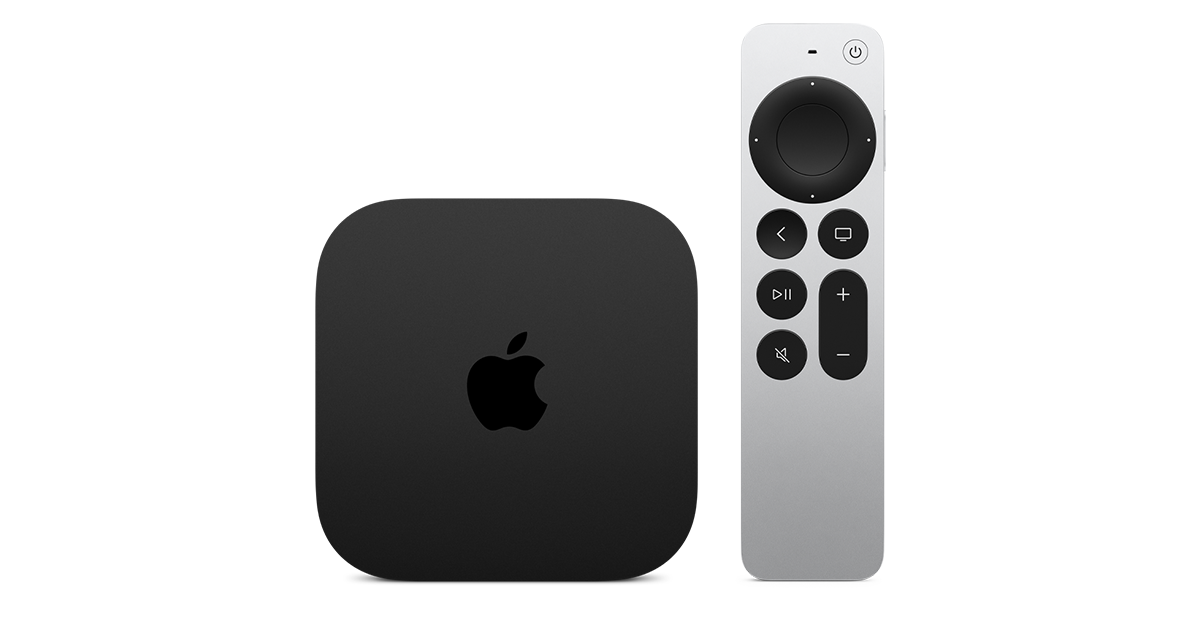
The fourth-generation Apple TV 4K, released in November 2026, is the most powerful streamer in this group by a wide margin. It runs on the A19 chip, the same family of silicon as the newest iPhones, with 8 GB of memory and a single 128 GB storage configuration. It adds Wi-Fi 7, Bluetooth 6, Thread and Gigabit Ethernet, and it supports Dolby Vision, HDR10+ and Dolby Atmos. Three far-field microphones let you talk to Siri hands-free, and it can link up to four HomePods for surround sound.
The remote is the detail that owners notice daily. It is aluminium, charges over USB-C, and now supports Find My, so a lost remote can be located like a lost key instead of searched for down the side of the sofa. Siri AI is labelled a beta by Apple, and its answers can be wrong, so treat the voice features as a convenience rather than a source of truth. The box is the same size and shape as the 2022 model, so it fits the same shelf and the same cables.
The trade is the price and the single configuration. There is no cheaper model with less storage, which is a shame for a household that streams everything and stores nothing. It is the most expensive streamer here, and a household without iPhones, iPads or HomePods will not use half of what it does. For an Apple household with a good television, it is still the best streamer you can buy, and it is not close.
Our Call
For an Apple household, this is the best streamer in the group by a wide margin. The chip, the remote and the HomePod surround are the reasons.
Pros
- A19 chip with 8 GB of memory, fastest here
- 128 GB of storage as standard
- Wi-Fi 7, Thread and Gigabit Ethernet
- Find My support on the remote
- Surround sound across up to four HomePods
Cons
- Most expensive streamer in this group
- No cheaper lower-storage model
- Siri AI is a beta and its answers can be wrong
- Overkill without other Apple devices
The Best Fire TV Stick — Amazon Fire TV Stick 4K Max
Amazon Fire TV Stick 4K Max — Best Fire TV Stick

The Fire TV Stick 4K Max is the fastest stick Amazon makes, and the one to buy if your household already lives in Alexa. It carries 16 GB of storage and 2 GB of memory, twice the storage of the standard Fire TV Stick 4K, and it supports Wi-Fi 6E for a faster, less congested wireless connection. It streams in 4K Ultra HD with Dolby Vision, HDR10+ and Dolby Atmos, and the Alexa Voice Remote Enhanced controls the television as well as the stick.
The practical advantage is storage. Streaming sticks fill up fast with apps, and 16 GB means the stick can hold the apps you actually use without the constant delete-and-reinstall cycle that smaller sticks force on you. AI-powered Fire TV Search helps find shows faster, and the stick works with the free and live television channels that Fire TV bundles in, so it can replace a cable box on a second television as well as a main one.
The limits are the usual Fire TV ones. The interface pushes Amazon’s own content hard, and the stick has no Ethernet port, so a weak Wi-Fi signal will still cause buffering no matter how fast the chip is. Amazon has also released a newer Fire TV Stick 4K on a different operating system, so buyers who want the newest platform rather than the most capable stick should check which model they are ordering. For an Alexa household that wants the best Fire TV stick, this is the pick.
Our Call
For an Alexa household, this is the best Fire TV stick you can buy. The storage, the Wi-Fi 6E and the Dolby Vision support are the reasons.
Pros
- 16 GB of storage, twice the standard stick
- Wi-Fi 6E for a faster wireless connection
- Dolby Vision, HDR10+ and Dolby Atmos
- Alexa Voice Remote Enhanced with TV controls
- AI-powered search across apps
Cons
- No Ethernet port, Wi-Fi only
- Interface pushes Amazon content hard
- A newer Fire TV Stick 4K runs a different system
- Needs a strong Wi-Fi signal to shine
The Best Simple 4K Stick — Roku Streaming Stick Plus
Roku Streaming Stick Plus — Best Simple 4K Stick

The Roku Streaming Stick Plus, model 3830R, is the 2025 replacement for the Express 4K+, and it is the simplest route to 4K streaming in this group. It plays up to 4K at 60 frames per second with HDR10, HDR10+ and HLG support, and it comes with a voice remote that controls the television’s power and volume, so one remote does the whole job. It can be powered from the television’s USB port, and it has a direct Bluetooth headphone mode for late-night watching without waking the house.
Roku’s advantage is the interface. It is the same grid of apps on every Roku, with no content pushed ahead of anything else, and it carries the free and live television channels that Roku bundles in. The stick is small, it hides behind the television, and it sets up in minutes. Roku rates it for 4K HDR streaming, and it is the stick to buy for a second television, a bedroom, or a parent’s house.
The trade is that Dolby Vision is reserved for the higher Streaming Stick 4K, so a Dolby Vision television will not get its best format from this stick. It also has no Ethernet port and no wired option, so a weak Wi-Fi signal is its ceiling. For a household that wants the simplest 4K stick and the simplest remote, those are fair trades.
Our Call
For the simplest 4K stick with the simplest remote, this is the pick. It hides behind the television and just works.
Pros
- 4K HDR with HDR10+ and HLG
- Voice remote controls TV power and volume
- Bluetooth headphone mode for late viewing
- Can be powered from the TV’s USB port
- Simplest interface in this group
Cons
- No Dolby Vision, reserved for the higher stick
- No Ethernet port, Wi-Fi only
- Storage figure not published
- Not the pick for a home-theatre setup
The Best Full-Size Box — Roku Ultra
Roku Ultra — Best Full-Size Box

The Roku Ultra is Roku’s flagship box, and it is the pick for a main television where a stick’s compromises start to show. It streams in 4K with HDR10+, Dolby Vision and HLG, and Dolby Atmos sound, and it has an Ethernet port for a wired connection, which is the most reliable fix for buffering. It supports Wi-Fi 6 and Bluetooth, and it has a USB port and a microSD slot for extra storage and local media.
The remote is the best in the Roku line. The Voice Remote Pro is rechargeable over USB-C, so there are no batteries to buy, and its buttons are backlit for dark rooms. It has a lost-remote finder, hands-free voice control, and personal shortcut buttons. The box itself is small and quiet, and it sits beside the television rather than hanging behind it.
The trade is that it is a box, not a stick, so it needs a surface and a power outlet, and it costs more than any Roku stick. It is also overkill for a bedroom television that only watches one or two apps. For a main television, a home theatre, or a household that wants the best Roku with a wired connection, it is the pick.
Our Call
For a main television on Roku, this is the pick. The Ethernet port, the Dolby Vision support and the rechargeable backlit remote are the reasons.
Pros
- Ethernet port for a wired connection
- Dolby Vision, HDR10+ and Dolby Atmos
- Rechargeable backlit Voice Remote Pro
- Lost-remote finder built in
- Wi-Fi 6 and Bluetooth support
Cons
- Needs shelf space and a power outlet
- Costs more than any Roku stick
- Overkill for a bedroom television
- Storage figure not published
Buying Guide
Start with the household, not the hardware. The best streamer is the one that matches the phones, speakers and voice assistant already in the house. Apple households get more from the Apple TV 4K, Google and Android households from the Google TV Streamer, Alexa households from the Fire TV Stick 4K Max, and households that want the simplest remote from a Roku. A mismatched streamer works, but it never feels as good as a matched one.
Match the box to the television. A 4K Dolby Vision television deserves a streamer that outputs Dolby Vision, and a soundbar or AV receiver deserves one that outputs Dolby Atmos. A 1080p television in a bedroom needs none of that, and a simple stick is the right buy there. Check the television’s formats before the streamer’s spec sheet.
Storage is the hidden limit. Sticks fill up with apps, and a full stick slows down and forces deletions. The Google TV Streamer’s 32 GB, the Apple TV 4K’s 128 GB and the Fire TV Stick 4K Max’s 16 GB are all answers to the same problem, in different sizes. If you use more than a handful of apps, buy the storage.
Wired beats wireless for the main television. The Google TV Streamer and the Roku Ultra both have Ethernet ports, and a wired connection removes buffering, stuttering and Wi-Fi congestion in one move. If the router is near the television, use the cable. If it is not, the Wi-Fi 6E on the Fire TV Stick 4K Max and the Wi-Fi 7 on the Apple TV 4K are the next best thing.
Count the remotes. A streamer remote that controls the television’s power and volume replaces two remotes with one, and a remote that can be found when lost saves the weekly sofa search. The Roku Voice Remote Pro and the Apple Siri Remote with Find My are the best here; the Fire TV and Google remotes are close behind.
Which streaming device is best overall?
The Google TV Streamer 4K, because it combines 32 GB of storage, an Ethernet port, Dolby Vision and Atmos, and a smart-home hub in one box. Apple households should buy the Apple TV 4K instead, and Alexa households the Fire TV Stick 4K Max.
Is a streaming stick or a box better?
A box is better for a main television: it has more storage, a faster processor, an Ethernet port and a better remote. A stick is better for a second television, a bedroom, or a television that only needs one or two apps, because it hides behind the screen and costs less.
Do I need Dolby Vision?
Only if your television supports it. Dolby Vision is a picture format, and a streamer cannot add it to a television that does not have it. If your television does support it, the Apple TV 4K, the Google TV Streamer, the Fire TV Stick 4K Max and the Roku Ultra all output it; the Roku Streaming Stick Plus does not.
How much storage does a streaming stick need?
More than you think. Apps, caches and updates fill a small stick fast, and a full stick slows down. The 16 GB on the Fire TV Stick 4K Max is a practical minimum for a household with several apps, and the 32 GB on the Google TV Streamer and the 128 GB on the Apple TV 4K remove the problem entirely.
Can a streamer replace cable?
For many households, yes. The free and live television channels bundled into Roku, Fire TV and Google TV cover news, sport and entertainment without a subscription, and the paid apps cover the rest. A wired connection and a good remote make the switch feel like an upgrade rather than a compromise.
Conclusion
Start with the Google TV Streamer 4K unless something specific rules it out: its storage, its wired port and its smart-home hub cover the main-television job end to end. Take the Apple TV 4K for an Apple household, the Fire TV Stick 4K Max for an Alexa household, the Roku Streaming Stick Plus for the simplest 4K stick, and the Roku Ultra for a main television on Roku with a wired connection. Whichever you choose, match it to the household first and the television second, because the ecosystem is what you live with every night.


