Best Smart Locks for Renters in 2026

- ✓Every guide starts as a full comparison video — we compare the gadgets side by side before we write a word.
- ✓Every pick is checked against the manufacturer’s own listings — specs come from the maker, not from another roundup.
- ✓Clear winners for every budget — the pick is the pick, whether it costs the least or the most.
- ✓No paid placements — a brand cannot pay to be picked.
This article contains Amazon affiliate links. As an Amazon Associate we earn from qualifying purchases — it never changes our picks. #ad
Best Smart Locks for Renters in 2026

A renter’s smart lock has one hard rule: it must come off cleanly when you move out. No drilling, no replacing the outside of the door, no argument with the landlord about a deadbolt you changed. The locks below all respect that rule, and they differ mainly in how much of your existing door they leave untouched.
Start with your door, not the lock. What deadbolt do you already have, and does the lock you are considering fit over it? Most renter-friendly locks clamp onto the inside of your existing deadbolt, leaving the outside — the keyhole your landlord cares about — exactly as it was. The second question is the key: does your landlord need a key to still work, and do you need to hand the lock back in its original state? If the answer to either is yes, a retrofit lock is the only safe choice.
Nothing here is presented as lab testing by us. Fit, battery claims, compatibility and subscription terms are taken from the makers’ own pages, manuals and shop listings. Where a maker and a listing disagree, the maker’s figure is used. One point to check before you buy any lock here: tell your landlord what you plan to fit, and keep the original hardware so you can put it back.
Top 3
- August Wi-Fi Smart Lock (4th Gen) — the best lock for renters Fits over your existing deadbolt in minutes, leaves the outside unchanged, and your old key still works.
- Yale Assure Lock 2 — the best keypad lock for renters who can swap a deadbolt A full keypad deadbolt that is easy to fit and easy to remove, with Wi-Fi and codes for guests.
- ULTRALOQ U-Bolt Pro — the best fingerprint lock for renters Fingerprint, code, key and app in one lock, with a weather rating that suits an exposed front door.
How the Five Smart Locks for Renters Compare
| Lock | Best For | Fitting | Unlock methods | Needs a hub |
|---|---|---|---|---|
| August Wi-Fi Smart Lock (4th Gen) | Renters, no drilling | Over existing deadbolt | App, auto-unlock, key | No, Wi-Fi built in |
| Yale Assure Lock 2 | Keypad, guests | Replaces deadbolt | Code, key, app | No, Wi-Fi built in |
| ULTRALOQ U-Bolt Pro | Fingerprint | Replaces deadbolt | Fingerprint, code, key, app | Bridge for remote access |
| Aqara Smart Lock U50 | Apple Home renters | Replaces deadbolt | Fingerprint, code, key, app | No, with Apple Home |
| Wyze Lock Bolt | Budget renters | Replaces deadbolt | Fingerprint, code, key, app | No |
The Best Renters — August Wi-Fi Smart Lock (4th Gen)
August Wi-Fi Smart Lock (4th Gen) — Best for Renters
The August Wi-Fi Smart Lock is the renter’s lock, because it is the only one here that does not replace your deadbolt at all. It fits over the inside of your existing deadbolt in minutes, leaving the outside of the door — the keyhole, the finish, the landlord’s lock — completely unchanged, and your old key still works from outside. When you move out, it comes off and the door is exactly as it was.
It has Wi-Fi built in, so there is no hub to buy, and it offers auto-unlock as you approach, remote locking from the app, and temporary codes and keys for guests. It has no keypad of its own, so codes are entered in the app or through a separate keypad accessory. For a renter, that trade is worth it: nothing is drilled, nothing is replaced, and nothing needs explaining to a landlord.
Our Call
For renters, this is the pick. It is the only lock here that leaves your door exactly as it was, and that is the whole point.
Pros
- Fits over your existing deadbolt — no drilling
- Outside of the door is completely unchanged
- Your old key still works
- Wi-Fi built in, no hub needed
Cons
- No keypad built in
- Auto-unlock needs your phone with you
- Battery life depends on use
- Guest codes need the app or an accessory keypad
The Best Keypad Lock for Renters — Yale Assure Lock 2
Yale Assure Lock 2 — Best Keypad Lock for Renters

The Yale Assure Lock 2 is a full replacement deadbolt with a keypad, Wi-Fi built in, and a design that is easy to fit and easy to remove. It replaces your existing deadbolt with a keyed smart deadbolt, so you get a touchscreen keypad for codes, remote access from the app, and a physical key as a backup. It also includes DoorSense, which tells you if the door is open or closed.
It is a replacement, not a retrofit, so it does change the outside of the door — which means you need your landlord’s agreement and you need to keep the original deadbolt to put back. In return you get the most complete keypad lock in this group, with a clean design and a Wi-Fi module in the box. If your landlord agrees and you are happy to swap a deadbolt, it is the best keypad option here.
Our Call
For renters who can swap a deadbolt with permission, this is the best keypad lock here. Get the agreement in writing first.
Pros
- Keypad with codes for family and guests
- Wi-Fi built in, no hub needed
- DoorSense tells you if the door is open
- Physical key backup included
Cons
- Replaces your deadbolt — needs landlord agreement
- You must keep the original to put back
- No fingerprint reader on this model
- Batteries need replacing every few months
The Best Fingerprint Lock for Renters — ULTRALOQ U-Bolt Pro
ULTRALOQ U-Bolt Pro — Best Fingerprint Lock for Renters
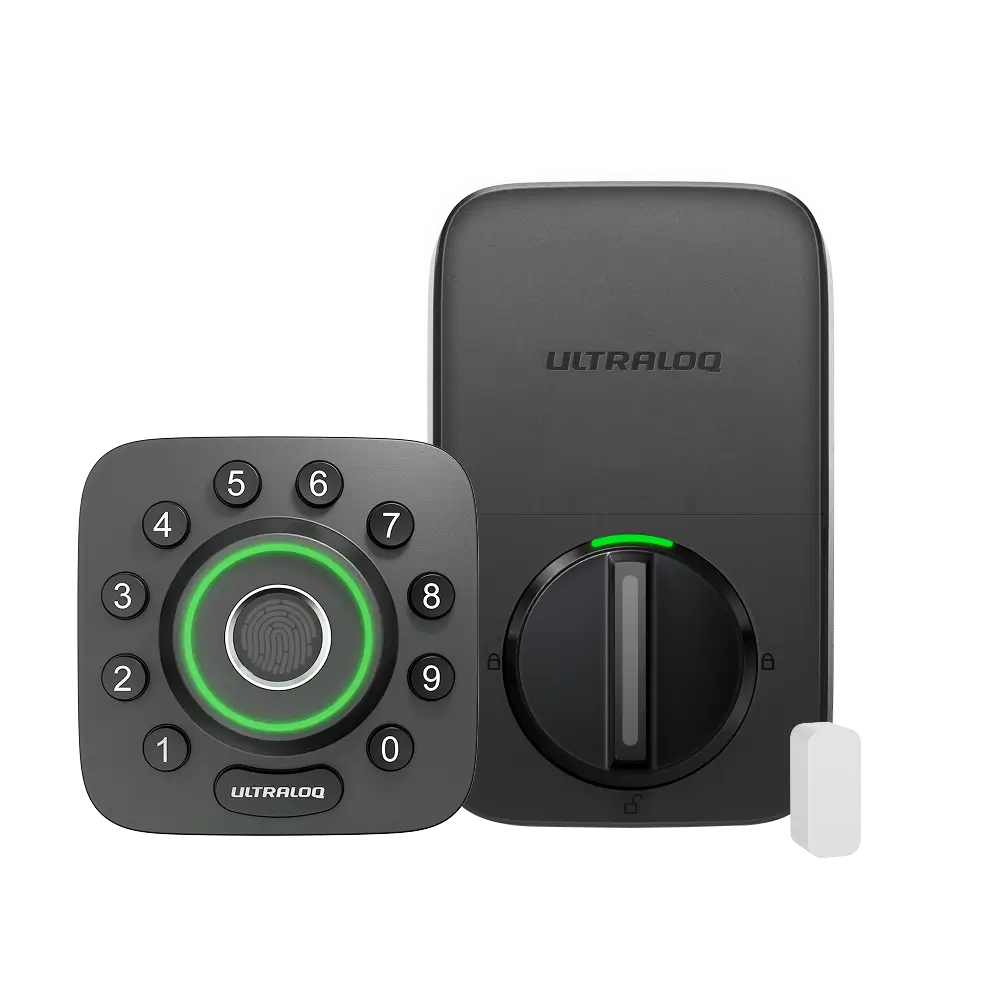
The ULTRALOQ U-Bolt Pro is the most versatile lock in this group: fingerprint, code, key and app, all in one deadbolt, with a 360-degree fingerprint reader that works from any angle and an IP65 weather rating for an exposed front door. The maker rates its battery at up to a year, which is the longest claim in this group.
It is a replacement deadbolt, so it needs the same landlord agreement as the Yale, and remote access needs the ULTRALOQ Bridge, which is sold separately. In return you get the fastest way in — a finger on the reader — and a lock that suits a household where not everyone wants to remember a code. For a renter with permission to swap a deadbolt, it is the most capable lock here.
Our Call
For renters who can swap a deadbolt and want fingerprint entry, this is the pick. Budget for the Bridge if you want remote access.
Pros
- Fingerprint, code, key and app in one lock
- 360-degree fingerprint reader
- IP65 weather rating
- Battery rated at up to a year
Cons
- Replaces your deadbolt — needs landlord agreement
- Remote access needs a separate Bridge
- Fingerprint reader needs clean, dry fingers
- Heavier and bulkier than a retrofit lock
The Best Apple Home Renters — Aqara Smart Lock U50
Aqara Smart Lock U50 — Best for Apple Home Renters
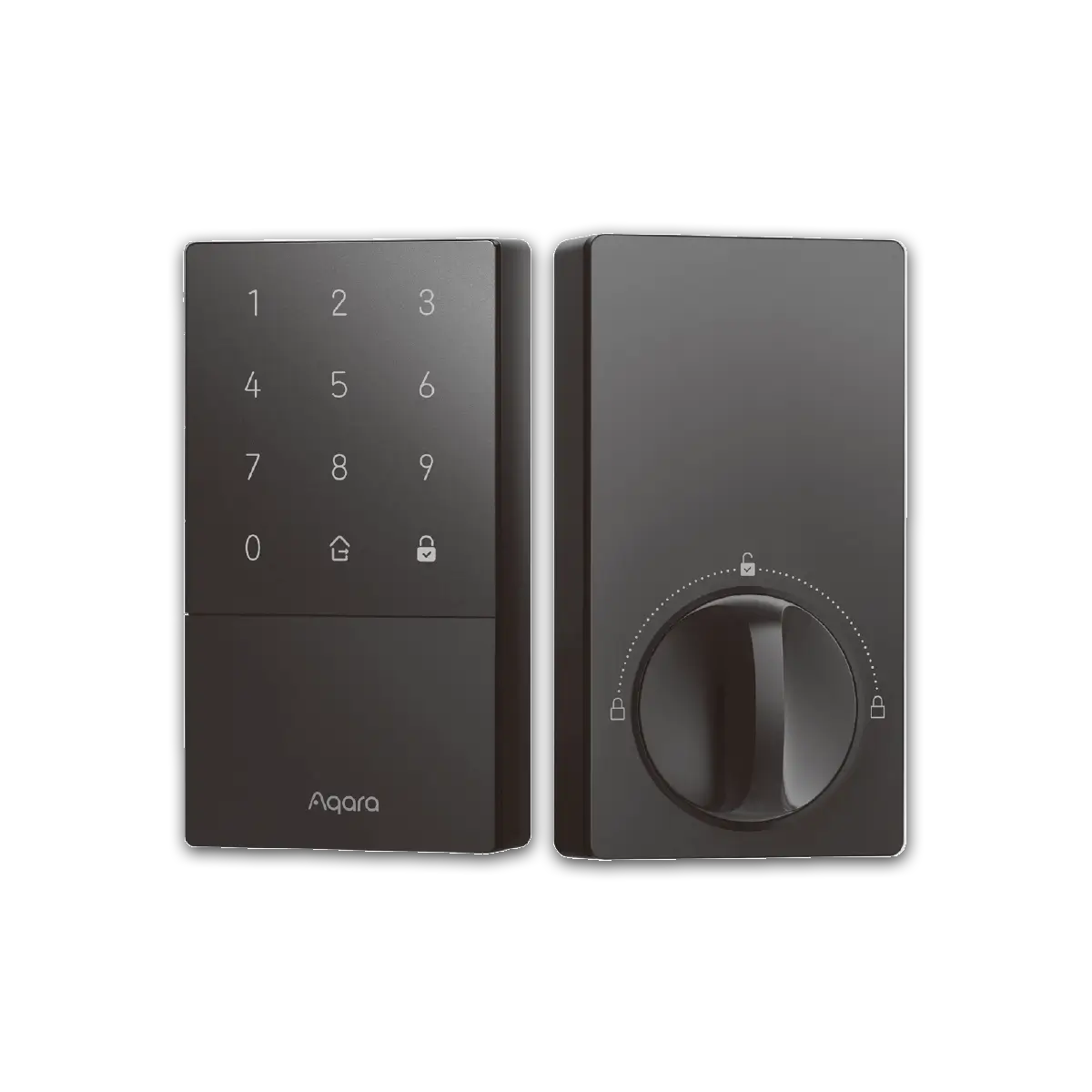
The Aqara Smart Lock U50 is a replacement deadbolt built for Apple Home households, with fingerprint, code, key and app entry, and Matter and Home Key support. It fits a standard deadbolt, it is easy to fit and remove, and it works with Apple Home, Alexa and Google Home, so it suits a mixed household as well as an Apple one.
It is a replacement, so it needs landlord agreement and the original deadbolt kept safe, like the Yale and the ULTRALOQ. Its strength is its smart-home fit: if your home already runs on Apple Home, the U50 drops in without a new hub or a new app to learn. No verified Amazon listing for this exact model could be pinned down in this round of work, so this guide has no buy link for it; check Aqara’s own store and the listing before you buy.
Our Call
For Apple Home renters who can swap a deadbolt, this is the pick. Its smart-home fit is the reason to choose it.
Pros
- Fingerprint, code, key and app entry
- Matter and Apple Home Key support
- Works with Apple Home, Alexa and Google
- Easy to fit and remove
Cons
- Replaces your deadbolt — needs landlord agreement
- No verified Amazon listing found in this round
- Some features need an Apple home hub
- Battery life depends on use
The Best Budget Lock for Renters — Wyze Lock Bolt
Wyze Lock Bolt — Best Budget Lock for Renters
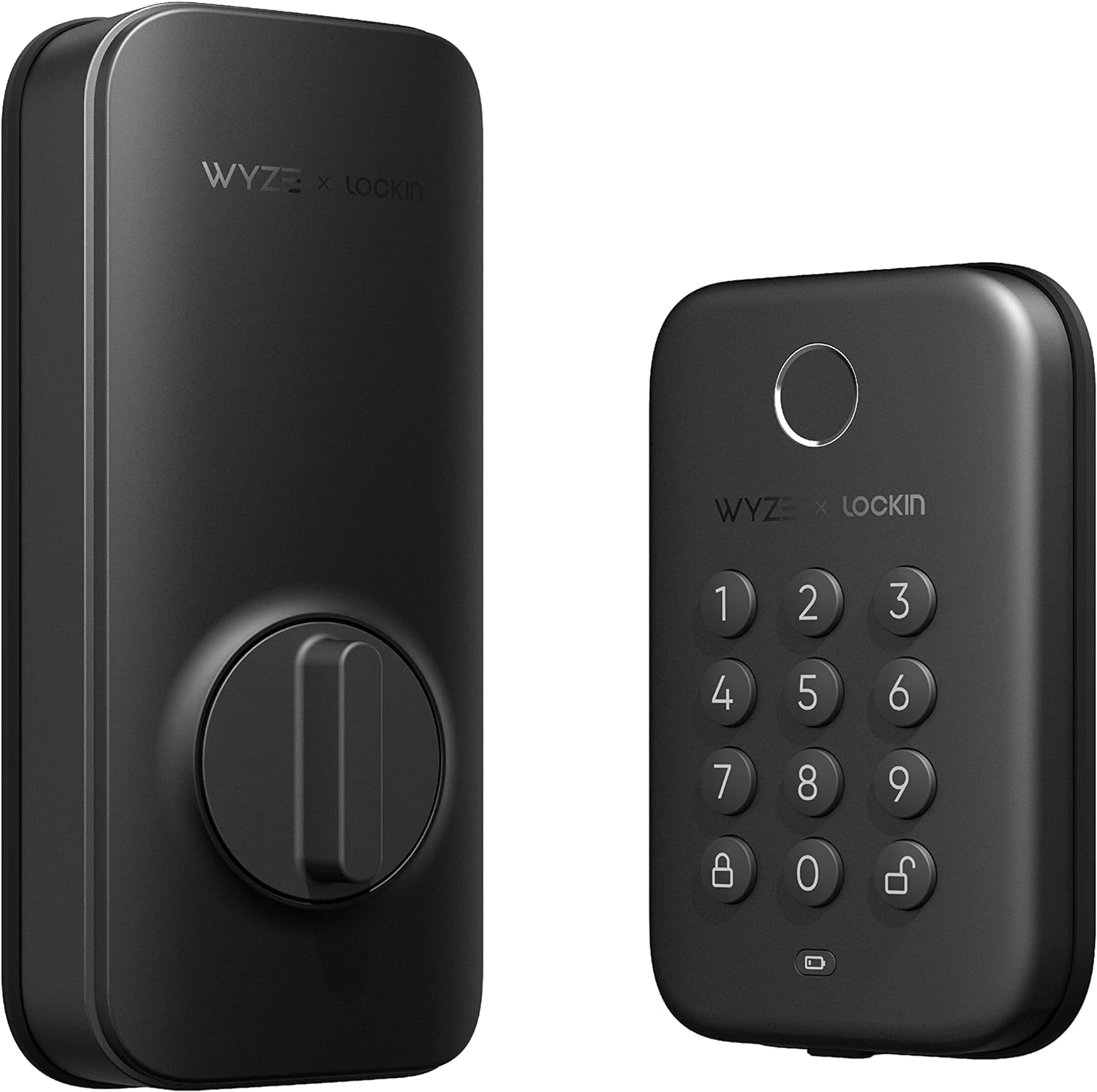
The Wyze Lock Bolt is the cheapest smart lock in this group, and it is a straightforward replacement deadbolt with a fingerprint reader, a keypad, a key and app control. It has no Wi-Fi — it connects by Bluetooth — which keeps the cost down and the setup simple, though it means no remote locking unless you are nearby.
It is a replacement deadbolt, so it needs the same landlord agreement as the other replacement locks here, and you should keep the original deadbolt to put back. Its trade-off is clear: you give up remote access and Wi-Fi, and in return you get fingerprint and keypad entry for the lowest outlay in this group. No verified Amazon listing for this exact model could be pinned down in this round of work, so this guide has no buy link for it; check Wyze’s own store and the listing before you buy.
Our Call
For renters on a tight budget who can swap a deadbolt, this is the pick. Accept that remote access is not part of the deal.
Pros
- Lowest-cost smart lock in this group
- Fingerprint and keypad built in
- Simple Bluetooth setup, no hub
- Physical key backup
Cons
- No Wi-Fi — no remote locking
- Replaces your deadbolt — needs landlord agreement
- No verified Amazon listing found in this round
- Fewer smart-home integrations than rivals
A note on the deposit. A smart lock is a deposit question as much as a security question. Before you fit anything, photograph the door, the deadbolt and the strike plate as they are, and keep those photos with the original hardware. When you move out, restore the door to exactly that state — same deadbolt, same screws, same strike plate — and photograph it again. A landlord who can see the door is unchanged has no reason to hold back a deposit, and the ten minutes it takes to restore the door is the cheapest insurance in this whole guide.
Buying Guide
Retrofit first, replacement second. If you can avoid replacing the deadbolt at all, do. The August lock fits over your existing deadbolt and leaves the door unchanged, which is the safest option for any rental. Only consider a replacement lock if your landlord agrees and you keep the original hardware.
Get the agreement in writing. A verbal yes is not enough when a deposit is at stake. Tell your landlord exactly what you plan to fit, how it attaches, and that you will restore the door when you leave — and keep the original deadbolt, screws and strike plate in a labelled bag.
Check the deadbolt before you buy. Retrofit locks fit most standard single-cylinder deadbolts, but not all. Measure your deadbolt, check the maker’s compatibility list, and confirm the backset and the tailpiece. A lock that does not fit your door is a return, not a project.
Think about keys and codes for guests. A renter’s lock is often shared with a cleaner, a dog walker or a guest. A lock with temporary codes or app keys is worth more than a lock with a single code, because you can revoke access without changing the lock.
Plan the move-out now. The day you fit the lock, put the original hardware in a bag and label it. When you move out, you will need it, the screws, and ten minutes — and a door restored to its original state is a deposit returned in full.
Can renters install a smart lock?
Yes, if the lock fits without permanent changes. Retrofit locks like the August fit over your existing deadbolt with no drilling. Replacement locks need your landlord’s agreement, and you should keep the original hardware to put back.
What is the best smart lock for a rental?
The August Wi-Fi Smart Lock (4th Gen), because it fits over your existing deadbolt, leaves the outside unchanged, and your old key still works. It is the only lock here that changes nothing about the door.
Do I need my landlord’s permission for a smart lock?
For a retrofit lock, tell them as a courtesy. For a replacement deadbolt, get permission in writing — you are changing the door’s hardware, and your deposit can depend on restoring it.
Can I take my smart lock with me when I move?
Yes, if it is a retrofit or a replacement you fitted yourself. Remove it, restore the original deadbolt, and fit the smart lock to your next door if it is compatible.
Do smart locks work without Wi-Fi?
Yes, for local unlocking: fingerprint, code and key all work without Wi-Fi. Remote locking, guest codes and alerts need Wi-Fi or a hub, depending on the lock.
Conclusion
Start with the August Wi-Fi Smart Lock if you rent — it is the only lock here that leaves your door untouched. If your landlord agrees to a replacement, the Yale Assure Lock 2 is the best keypad option and the ULTRALOQ U-Bolt Pro is the best fingerprint option. Whatever you fit, keep the original hardware in a labelled bag; that bag is your deposit.


