
ECOVACS DEEBOT T50 MAX PRO OMNI Review
This ecovacs deebot t50 max pro review covers the mid-range dock-station option in our five-model comparison: an OMNI dock that automates emptying, mop washing, drying, and refilling, plus a ZeroTangle brush positioned for pet hair and a mop that lifts 18 millimetres over carpets.
ECOVACS has been in the robot vacuum game for a long time, and the DEEBOT T50 MAX PRO OMNI represents its dock-station approach in the mid-range. In our channel’s five-model comparison it sits in the roughly $450 class — between the budget Shark and the premium flagships. This review looks at what the OMNI dock positioning means, and who this model is built for. For readers comparing this ecovacs deebot t50 max pro omni with its siblings, the variant name is the part to check first — the dock features and included accessories differ between siblings, and the listing for your exact model is the document that counts.
Key Takeaways
- The dock-station option in the middle of our five-model comparison, from ECOVACS, a long-established robot vacuum brand.
- OMNI dock station: the station handles emptying, mop washing, drying and refilling.
- ZeroTangle brush and BLAST airflow system, positioned specifically for pet hair, with less time spent cutting tangles by hand.
- TruEdge edge cleaning reaches toward wall edges, and the mop lifts 18 millimetres over carpets, per ECOVACS.
- Advertised 18,500Pa suction is a manufacturer claim, not a cleaning score; check the exact “T50 MAX PRO OMNI” variant when comparing listings.
Note: The video above uses AI-generated visualizations based on manufacturer listings — it is not hands-on test footage.
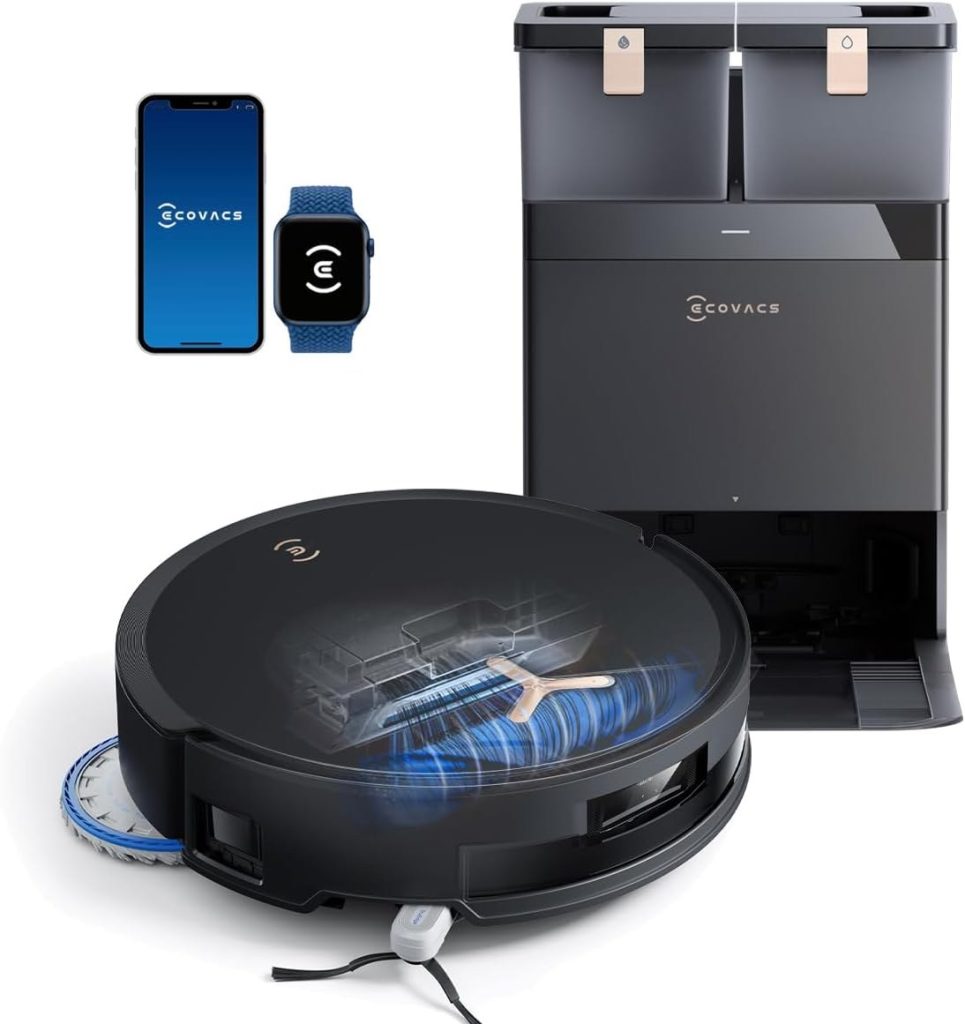
Key Specs at a Glance
In our comparison, the ECOVACS made its case on paper before any discussion of price: a pet-hair brush system and a dock that takes over the routine jobs. Every figure in this table is a manufacturer claim for this model, as listed — including the suction number, which is an advertised maximum, not a cleaning score.
| Spec | Detail |
|---|---|
| Price class | Roughly the $450 class — the middle of our five-model comparison |
| Suction | Advertised 18,500Pa (ECOVACS manufacturer claim), with a BLAST airflow system |
| Brush | ZeroTangle brush, designed for pet hair with less time spent cutting tangles |
| Edge cleaning | TruEdge edge cleaning, reaching toward wall edges |
| Mop lift | Mop lifts 18 millimetres over carpets, per ECOVACS |
| Dock | OMNI dock station — automates emptying, mop washing, drying and refilling |
| Line | DEEBOT line from ECOVACS, a long-established robot vacuum brand |
Key Features
- OMNI dock station model: the dock acts as the robot’s home base for emptying and servicing
- Mid-range positioning in the ~$450 class of our five-model comparison
- DEEBOT line from ECOVACS, a long-established robot vacuum brand
- “MAX PRO” tier naming within the T50 family — check the exact variant when comparing listings
- ZeroTangle brush and BLAST airflow: ECOVACS positions both around pet hair, aiming to cut the time spent clearing tangles by hand
- TruEdge edge cleaning: reaches toward wall edges, where hair and dust collect
- Mop lift over carpets: the mop lifts 18 millimetres, per ECOVACS, to keep wet pads off rugs and carpet
- OMNI dock automation: the station handles emptying, mop washing, drying and refilling
In our comparison, the ECOVACS was the pet-hair specialist of the mid-range on paper. The ZeroTangle brush and BLAST airflow system are positioned specifically for hair, TruEdge works the wall edges where hair settles, and the mop lift keeps wet pads off carpets when a run crosses from hard floor to rug. Layer the OMNI dock on top — emptying, washing, drying and refilling handled at the station — and the pitch is a routine that asks little of you between runs.
Pros and Cons
In our comparison, what stood out about the T50 MAX PRO OMNI was how much of the routine the dock and the brush system take over. The trade-offs are the standard dock trade-offs: floor space, water care, and value that only shows up if you actually use the mop automation.
Pros
- Advertised 18,500Pa suction with a ZeroTangle brush and airflow system positioned specifically for pet hair
- TruEdge side cleaning reaches toward wall edges, and the mop lifts 18 millimetres over carpets
- OMNI dock automates emptying, mop washing, drying and refilling — fewer routine jobs land back on you
- Mid-range price class, between the budget Shark and the flagship tier
Cons
- The full-size dock needs floor space and ongoing water care
- Suction figures are manufacturer claims, not a cleaning score
- Only worth its price if you will use the mop automation — mostly-carpet homes may not
What to Know Before You Buy
The OMNI dock is the story here. Dock-station models shift the routine from daily bin emptying to periodic dock maintenance: the robot returns to the station, empties into it, and the station becomes the thing you service occasionally instead of the robot every day. If that hands-off pattern is what you are shopping for, the T50 MAX PRO OMNI is ECOVACS’ entry in that category within our comparison’s middle tier.
Positioning-wise, it sits between two clear alternatives: the roughly $200 Shark Matrix Plus if budget is the priority, and the roughly $500 Dreame L40 Ultra Gen 2 if you want “Ultra”-style positioning. The ECOVACS makes its case as the established-brand dock option in between, so compare the three listings directly on current price and included accessories before deciding — mid-range pricing moves around a lot with promotions.
Also plan for the dock itself: it needs a permanent spot with clearance in front, and consumables are an ongoing cost with any dock system. Model naming in the DEEBOT range is dense, so double-check you are viewing the T50 MAX PRO OMNI specifically, not a sibling variant. Confirm full specifications on the manufacturer’s listing. If you are checking an ecovacs t50 max pro omni listing, confirm the variant name on that listing first — this review covers the MAX PRO OMNI specifically, and sibling listings can look nearly identical.
T50 Pro Omni vs Max Pro Omni: Which Name Is Which
The T50 family has more than one OMNI-dock variant, and the variant name on the listing is what tells them apart. This review covers the MAX PRO OMNI specifically — the “MAX PRO” tier with the OMNI dock — and a sibling listing under a similar name is a different listing, not the same machine by another name. No specification, price, or accessory difference is stated here, since those vary by listing and region; compare the two listings directly on dock features and included accessories, and order only the variant whose name matches the one reviewed here.
The OMNI Station: What It Does and What Stays on Your List
Per ECOVACS’ positioning for this model, the station automates emptying, mop washing, drying, and refilling, alongside its role as the robot’s home base. That removes the least pleasant jobs of owning a mopping robot — dealing with a full bin and dirty pads after every run. What stays on your list is station upkeep: water care, wiping the station tray, and keeping the station area clear so the robot finds its home reliably. Two station questions to confirm on the listing for your exact model: how detergent is handled, and how the station senses dirty water — sources describe these details differently across listings, so no claim is made here, and the listing for your exact model is the document that counts.
Setup and Mapping: The First Run Matters Most
Mapping is mostly first-run work: the robot learns your floor plan on its early runs, and the app then lets you use that map instead of running the whole home every time. Give the first mapping run a clear floor — cables, shoes, and loose rugs slow it down and teach it the wrong layout. If your home has more than one floor, check whether your exact model and app version support saved maps per floor before you buy, since multi-floor handling varies by model and app version. A tidy floor on mapping day is the cheapest setup improvement there is, and it costs nothing.
App and Voice Control: What to Check
The app is where a dock-station robot becomes a household tool rather than a novelty. Saved maps let you clean one room at a time, no-go zones keep the robot out of pet bowls and play areas, and scheduling keeps daily runs automatic. Check which of these your exact model and app version actually include before you buy, since scheduling and zone limits are the usual mid-range trade-offs. Voice control and smart-home support also vary by model and region — check the listing and the app for your exact model rather than assuming support from the brand name alone. If mapping or app behaviour ever seems off after setup, follow the manual’s reset and re-map steps for your exact model rather than assuming a fault in the machine.
Obstacle Avoidance: Tidy Before You Run
No avoidance system is perfect in a cluttered room, and a quick tidy before a run still helps any robot: shoes, cables, and pet toys are the usual rescue triggers. This review makes no avoidance claim beyond the manufacturer positioning it already states, and no test score is quoted here — check how the robot behaves around your own clutter during the return window instead of treating any avoidance claim as a guarantee. Homes with pets should weigh this as carefully as suction when they compare models, because a run that finishes without rescuing is worth more day to day than a run that needs help halfway through.
Side Brush Care: Check It on the First Runs
Edge cleaning works the wall edges where hair and dust collect, and that is also where a side brush meets its hardest test: lightweight rugs, rug fringes, and cables near the walls. On the first few runs, check how the side brush behaves around those edges in your own home, and move anything it catches on before the next run. No lab result or brush-behaviour score is claimed here — your floors are the test that counts, and the return window is the time to run it.
Pet Hair Care: Frequency Beats Any Single Feature
Pet hair is a maintenance question before it is a performance question. A robot that runs daily keeps hair from building up in the brushroll and the base, and that routine matters more than any single pickup claim. Check the brushroll after heavy shedding periods and whenever you notice hair wrapping, and clean the filters whenever airflow seems reduced or dust builds up visibly. This review positions the brush system around pet hair, and that positioning is best read as a maintenance story: less hand-clearing of tangles between runs, not a promise about any single run. No pickup percentages or test scores are quoted here, and no pet-hair performance result is claimed for this model.
Suction: What the Number Does and Does Not Tell You
Suction figures in this category are brand claims, not a shared cleaning score, and this review already says so about the advertised figure it states. A higher number does not always mean visibly cleaner floors, because pickup also depends on the brushroll, airflow, how the robot moves, and whether it makes repeated passes. Brands do not measure under one shared standard, so treat any suction figure as rough positioning between tiers, not a cleaning score. At the mid-range tier, dock work, edge reach, and run frequency matter at least as much as any single suction figure. No suction figure is restated here, and no measured output is claimed.
Mop Lift and Floor Transitions: the Check That Matters
Mop lift decides whether damp pads drag across your rugs. On low-pile rugs and hard floors, a small lift is usually enough; on thick or high-pile carpet, a mop that cannot lift clear will wet carpet it should have avoided, and carpet detection that backs the robot off rugs is only a partial answer. Before you buy, check the listing for your exact model’s mop-lift figure and for how it behaves on carpet — this review states its own lift claim elsewhere, and listings vary, so the listing for your exact model is the document that counts. If your home is mostly thick carpet with a mop-washing wish list, that is the point at which a vacuum-only routine, or a different tier, deserves a second look. No lift figure is stated here.
Noise: What to Expect
Robot vacuums are not silent, and suction mode changes how loud a run feels. Higher suction settings are louder, while quiet or eco modes trade some pickup for a calmer run. Many owners schedule cleaning while they are out, which makes noise a non-issue, but if you work from home or have light sleepers, check whether the model you are considering offers a quiet mode for daytime runs. No decibel figure is quoted here, since brands measure noise differently and room acoustics change how loud a robot sounds in practice.
Cost of Ownership: Consumables and No Subscription for the Core Routine
The robot’s price is only the first cost of ownership. Over its life you will replace mop pads, clean the brushroll and filters, and wipe the station tray — and this review already flags consumables as an ongoing cost for any dock system. No prices or service intervals are quoted here, since those change; the manual and the listing for your exact model are the documents that count. One cost that does not apply to the core routine: unlike some smart-home categories, a robot vacuum’s core cleaning — mapping, scheduling, and room cleaning — is not a subscription feature on this class of machine. If a listing mentions an optional paid app tier, treat it as optional, not required.
Dimensions, Height, and Dock Space
Two measurements decide whether this robot fits your home: the robot’s own height, which decides what furniture it can clean under, and the station’s footprint, which needs a permanent spot with clearance around it. This review already flags dock space as a buying consideration, and it applies twice over here — a station that washes and dries mops is not a small accessory. The listing for your exact model carries the figures; this review states none, since they vary by listing. Color options also vary by retailer and region, so confirm the color on the listing itself rather than from another model’s photos.
Who Should Skip It — and What to Compare Instead
Skip this model if your budget is firmly at the entry tier — the Shark Matrix Plus in our comparison covers the basics at the budget tier, including self-emptying — or if only the flagship will do, which is the Roborock Saros 20’s ground with its dual spinning mops. Skip it too if your home is mostly thick carpet and you want a mop-washing routine above all else; that combination is where the mop-lift check in this guide matters most. The T50 Pro Omni sibling is worth a listing-level look only if its variant name matches what you actually want — compare it by name, dock features, and included accessories, not by assuming it matches this review. Neither alternative is reviewed here beyond its role in our comparison, and neither changes the case for the ECOVACS itself — they are simply the comparisons worth making before you pay. For a mixed-floor home that mops often and wants a dock-based routine without flagship pricing, this model’s case in this review is the one to weigh.
Who It’s For
The DEEBOT T50 MAX PRO OMNI suits buyers who want a dock-based, low-involvement cleaning routine from an established brand, at a mid-range price. It is a natural shortlist candidate if the budget tier feels too basic and the flagship tier feels excessive. See the ECOVACS DEEBOT T50 MAX PRO OMNI listing for full details.
FAQ
What does the OMNI dock actually do?
Per ECOVACS’ positioning, the OMNI station automates emptying, mop washing, drying and refilling. In practice that shifts ownership from daily bin emptying and pad rinsing to periodic dock maintenance: water care, occasional cleaning of the station itself, and consumables over time. Plan a permanent spot with clearance in front of the dock.
Is the T50 MAX PRO OMNI good for pet hair?
It is the mid-range model in our comparison positioned most directly at pet hair: a ZeroTangle brush designed to reduce tangles, a BLAST airflow system, and TruEdge cleaning for the wall edges where hair gathers. As with every model here, daily scheduled runs matter more than any single feature — hair control is a frequency game.
What does the 18,500Pa suction figure mean?
It is ECOVACS’ advertised maximum for this model, not an independent pickup score, and brands do not measure under one shared standard. Use it for positioning inside the range. The brush design and the dock routine are the more useful parts of this model’s case.
Why are there so many similar DEEBOT names?
The DEEBOT range is dense, and the T50 family has several variants. This review covers the T50 MAX PRO OMNI specifically — the “MAX PRO” tier with the OMNI dock. Check the exact variant name on the listing before ordering, because dock features and included accessories differ between siblings.
How does it compare with the Shark and the Dreame in this lineup?
The Shark Matrix Plus, at roughly the $200 class, is the budget route to self-emptying without mop-washing automation. The Dreame L40 Ultra Gen 2, at roughly the $500 class, leans on “Ultra” all-round positioning and extendable edge tools. The ECOVACS sits between them as the established-brand dock option with a pet-hair focus. Compare the three listings on current price, since mid-range pricing moves with promotions.
What is the difference between the T50 Max Pro Omni and the T50 Pro Omni?
The two names are sibling variants in the same T50 family, and the variant name on the listing is what tells them apart. This review covers the MAX PRO OMNI specifically, and a Pro Omni listing is a different listing, not the same machine by another name. No specification, price, or accessory difference is stated here, since those vary by listing and region — compare the two listings directly on dock features and included accessories, and order only the variant whose name matches the one reviewed here.
How should I set up mapping on the first run?
Give the first mapping run a clear floor: cables, shoes, and loose rugs slow the robot down and teach it the wrong layout. Let the robot complete its early runs before judging its routes, since the map improves as it learns your floor plan. If your home has more than one floor, check whether your exact model and app version support saved maps per floor. No setup time or coverage figure is quoted here, since those vary by home; the manual for your exact model is the document that counts.
What upkeep does the OMNI station need?
The station shifts ownership from daily bin emptying and pad rinsing to periodic station maintenance: water care, occasional cleaning of the station tray, and consumables over time. Plan a permanent spot with clearance in front of the station, and keep the station area clear so the robot finds its home reliably. No service interval is stated as a fact here — the manual for your exact model gives the schedule, and homes with pets or heavy dirt will need checks more often than quiet apartments.
How These Picks Were Chosen
These picks come from our own Smart Tech & Gadget Finds video comparison of the five models in this series, weighed against published manufacturer specifications. No lab test scores, test hours, or units-tested figures are claimed here, because none were run for this guide. Suction figures and dock claims quoted in the review are manufacturer-advertised numbers, and the review says so wherever they appear.
Final Verdict
If you want a dock-based, low-involvement routine from an established brand — and pet hair is part of your daily floor reality — the DEEBOT T50 MAX PRO OMNI is the natural mid-range shortlist candidate in our comparison. Its OMNI dock takes over emptying, mop washing, drying and refilling, and its brush system is aimed squarely at hair. Skip it if your floors are mostly carpet and mop automation would go unused, or if the budget tier covers your needs. For mixed-floor homes that mop often, it earns its middle spot. If you arrived here searching for the ecovacs deebot t50 pro omni, note the distinction this review draws throughout: this article covers the MAX PRO OMNI, so confirm which variant your listing names before ordering, because dock features and included accessories differ between siblings.
Affiliate Disclosure: This article contains Amazon affiliate links. As an Amazon Associate, Smart Tech & Gadget Finds earns from qualifying purchases at no extra cost to you. #ad

