Smart Lock Buying Guide 2026
This smart lock buying guide starts with how you want to open your door, not with brands: fingerprint is fastest, a keypad is best for sharing codes, and a retrofit lock suits renters. For most full replacements, pick a keypad lock with a phone-tap option, because codes work when your hands are full or your phone is dead.
Every smart lock buying guide 2026 roundup starts with brands. We think that’s backwards. Start with how you want to open your door — fingerprint, a keypad code, a phone tap, or your existing key. That choice narrows the field fast, and it’s the part you’ll live with daily.
Key Takeaways
- Start with how you want to open your door — fingerprint, a keypad code, a phone tap, or your existing key. That choice narrows the field fast, and it is the part you will live with daily.
- Fingerprint is fastest, with nothing to remember — the ULTRALOQ U-Bolt Pro example pairs a 360° live fingerprint sensor with a keypad for up to 60 codes and two backup keys.
- A keypad is best for sharing codes with family and guests — the Schlage Encode Plus example gives up to 100 codes, built-in Wi-Fi with no hub, and Apple Home Key, with about 6 months of maker-rated battery life on four AAs.
- A retrofit lock suits renters, or anyone who wants to keep their deadbolt and keys — the August Wi-Fi Smart Lock (4th Gen) fits inside over the existing deadbolt, with built-in Wi-Fi, DoorSense and unlimited virtual guest keys in its free app.
- Hubs are the trap: some locks need a bridge for remote features even when the headline sounds built-in, and per the kit research, core locking, codes and history in these brands’ own apps do not require a subscription.
Below are the three main styles, plus four example locks that show how different the answers can be.
This article contains Amazon affiliate links. As an Amazon Associate we earn from qualifying purchases — it never changes our picks. #ad
Smart Lock Buying Guide 2026: Quick Verdict
Quick Verdict: Fingerprint is fastest, with nothing to remember. A keypad is best for sharing codes with family and guests. A retrofit lock suits renters, or anyone who wants to keep their deadbolt and keys. Our pick for most full replacements is a keypad lock with a phone-tap option, because codes work when your hands are full or your phone is dead.
Watch the full comparison:
The four example locks below are drawn from that comparison. When we lined them up by how you open them instead of by brand, fingerprint, keypad and retrofit fell out as the three honest styles — and the hub requirements and battery fine print, covered further down, are what separated locks within each style.
Fingerprint Locks: Fastest In
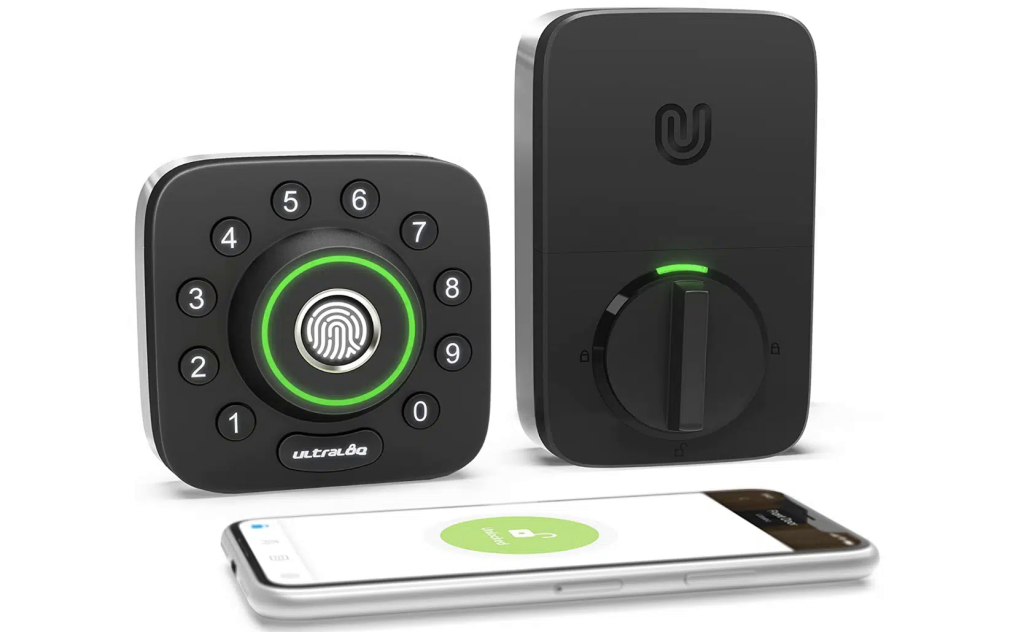
The ULTRALOQ U-Bolt Pro is the classic example: a 360° live fingerprint sensor, an anti-peep backlit keypad for up to 60 codes, and two backup keys. The maker rates battery life at up to 1 year, based on 8,000 accesses, and the exterior is IP65 rated.
- Pros: Nothing to remember; quick entry for enrolled users
- Cons: Remote and voice control need the separate ULTRALOQ Bridge — check the bundle
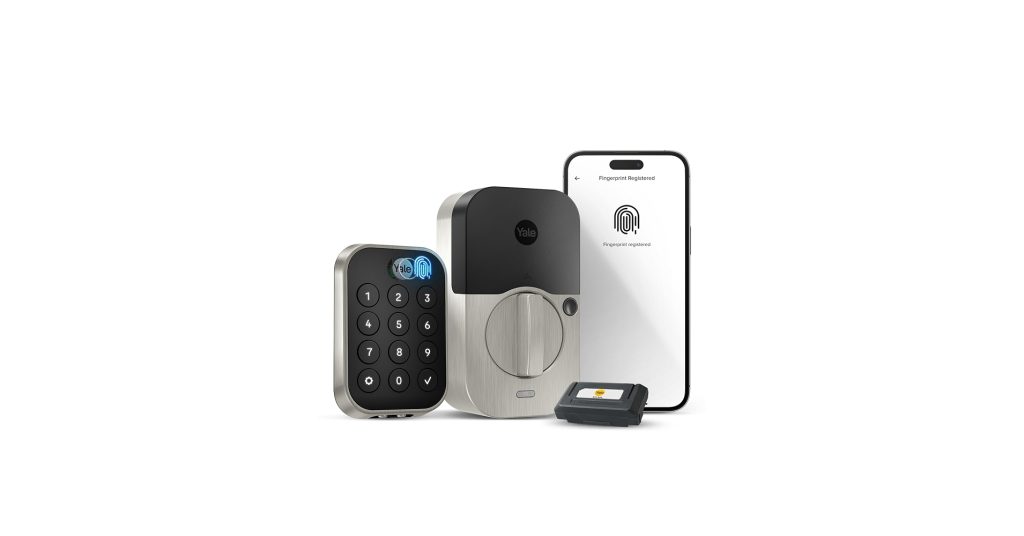
The Yale Assure Lock 2 Touch (Key-Free) goes further: no key cylinder at all. You get touchscreen and fingerprint entry, an included WiFi Smart Module, and DoorSense, which reports whether the door is open or closed, not just locked. If a listing photo shows a keyhole, it’s the wrong variant.
Keypad Locks: Best for Sharing

The Schlage Encode Plus is our keypad example — a full deadbolt replacement with built-in WiFi and no hub, a fingerprint-resistant touchscreen, up to 100 codes, a built-in alarm, and Apple Home Key for tap-to-unlock with an iPhone or Watch. Its maker-rated battery life is about 6 months on four AAs. To be clear, this lock has no fingerprint reader.
- Pros: Easy code sharing, Home Key, no subscription tier in the Schlage Home app
- Cons: Full replacement install; WiFi is 2.4 GHz only
Retrofit Locks: Keep Your Keys
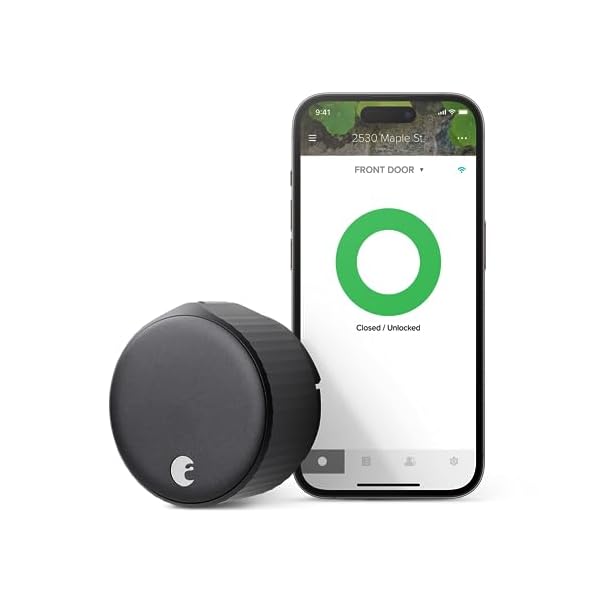
A retrofit lock fits inside your door, over your existing single-cylinder deadbolt. The exterior and your keys don’t change. The August Wi-Fi Smart Lock (4th Gen) is the example we’d show renters: a roughly 10 to 15 minute install, built-in WiFi, DoorSense, auto-lock and auto-unlock, and unlimited virtual guest keys in its free app. It runs on two CR123 batteries.
- Pros: Landlord-friendly, original keys still work
- Cons: No keypad on the lock — August’s Smart Keypad is sold separately
| Style | Best For | Key Detail |
|---|---|---|
| Fingerprint locks | Fastest entry | Nothing to remember; ULTRALOQ U-Bolt Pro example: 360° sensor, keypad for up to 60 codes, two backup keys, IP65 exterior |
| Keypad locks | Sharing codes | Schlage Encode Plus example: up to 100 codes, built-in Wi-Fi, no hub, Apple Home Key, about 6 months battery on four AAs |
| Retrofit locks | Renters | August Wi-Fi Smart Lock (4th Gen) example: fits inside over the existing deadbolt, exterior and keys unchanged, no keypad on the lock |
What Most Reviews Won’t Tell You
Battery figures are maker figures, and WiFi strength changes them — which is why we state no battery figure for the Yale or August locks; their sources publish no firm one. Hubs are the other trap: some locks need a bridge for remote features even when the headline sounds built-in. And no lock is unhackable or a guarantee of anything. A solid door, a good install and sensible code habits matter just as much.
Verdict
Fingerprint for speed, keypad for sharing, retrofit for renters. If you own your home, our pick is the keypad route with a phone-tap backup — the Schlage above shows why.
FAQ
Can I still use a physical key?
Often, yes — the Schlage and ULTRALOQ examples keep a key option. The key-free Yale doesn’t, by design.
Do smart locks need a subscription?
Per the kit research, core locking, codes and history in these brands’ own apps don’t require one.
Which style suits a rental?
A retrofit lock. It installs inside, leaves the exterior and your keys unchanged, and removes cleanly.


