
Fitpolo Smartwatch Review: Alexa on Your Wrist, Under $50
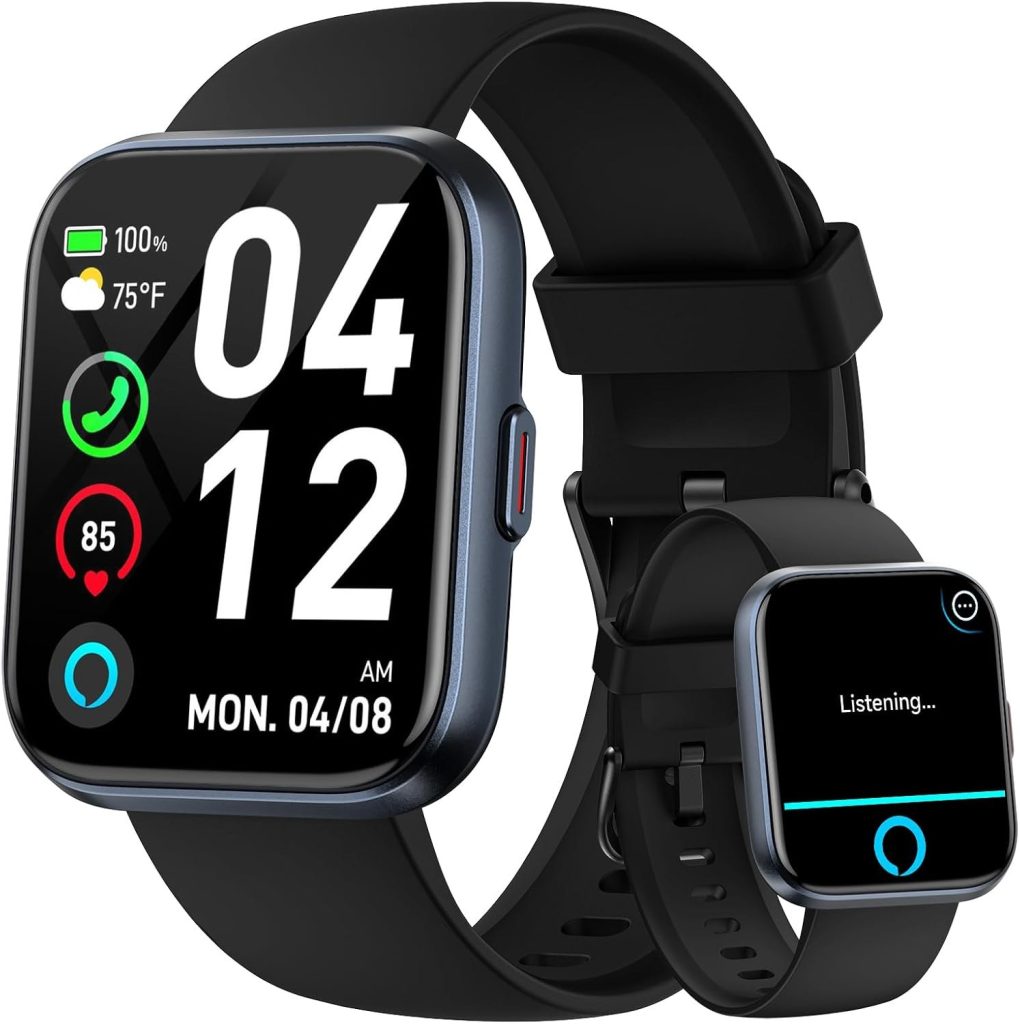
This fitpolo smartwatch review covers the budget watch that stands apart for voice control: Amazon Alexa built in, a 1.8-inch display, Bluetooth calls through a paired phone, and a deep-black case with a red side button. Message replies are not supported, as notifications on the watch are read-only.
Most budget smartwatches make you choose between looks and features. The Fitpolo Alexa Smartwatch tries to give you both: a clean deep-black case with a distinctive red side button, and Amazon Alexa built in — something you rarely see at the budget end of the market. We included it in our five-way comparison of budget smartwatches, and it’s the pick we’d point to for anyone who wants a voice assistant on their wrist without paying flagship money.
Key Takeaways
- Standout feature: Amazon Alexa built in — something rarely seen at the budget end of the market, and the reason it stands out in the five-way budget comparison.
- Design: a clean deep-black case and strap with a distinctive red side button, and a 1.8-inch display (seller-listed size).
- Calls and tracking: Bluetooth calls through a paired phone, and 110+ advertised sports modes with a solid set of everyday fitness features.
- Battery: up to 7 days typical use and 30 days standby (seller estimates).
- Hard limit: message replies are not supported — notifications are read-only on the watch; skip it if replying to messages from your wrist is a must, or if you have no use for Alexa.
Key Specs at a Glance
When we compared these side by side for our Smart Tech & Gadget Finds video, the Fitpolo was the budget watch that stood apart for voice control. Here are the seller-listed details that matter, in one place.
| Spec | Detail |
|---|---|
| Display | 1.8-inch (seller-listed size) |
| Voice assistant | Amazon Alexa built in |
| Calling | Bluetooth calls through a paired phone |
| Sports modes | 110+ advertised by the seller |
| Battery | Up to 7 days typical use and 30 days standby (seller estimates) |
| Design | Deep-black case and strap with a red side button |
| Message replies | Not supported — notifications are read-only on the watch |
Key Features
- Alexa built in — use voice requests right from the watch instead of pulling out your phone
- Deep-black case with a red side button — a sporty look that stands apart from plain black budget watches
- Everyday fitness tracking — the activity features you’d expect for steps, workouts and daily movement
- Part of our budget comparison — tested in our lineup against other budget models from TORJALPH, Choiknbo, Yoever and AEAC
Pros and Cons
In our comparison, what stood out was how much of the Fitpolo’s appeal sits in two things: Alexa and the design. The trade-offs are the usual budget ones, plus one specific limit worth knowing upfront. When you compare the best smartwatch under 50 options side by side, judge them on the basics you will actually use every day, and check each live listing before you order.
Pros
- Alexa is built in, so timers, reminders and quick questions can start from your wrist instead of your phone
- Paired-phone Bluetooth calling is included, so taking a call does not mean digging your phone out of a pocket
- The deep-black case and red side button give it more character than the plain designs around it
- 110+ sports modes are advertised, alongside everyday activity tracking for general fitness awareness
Cons
- You cannot reply to messages from the watch — the seller notes say message replies are not supported
- Battery figures are seller estimates, and heavy screen and voice use will bring the real number down
- Alexa needs setup and a supported connection to work, and wellness tracking is for general fitness awareness only, not medical use
What to Know Before You Buy
Let’s be straight about what a budget smartwatch is. Battery figures on watches in this class are seller estimates, so treat any runtime claim as a best-case number rather than a guarantee — your mileage will vary with how often you use the screen and voice features. Health and wellness tracking on budget watches is for general fitness awareness only; it is not medical-grade and is not intended to diagnose anything. Finally, check the current seller listing before you order, because features, compatibility and what’s in the box can change — and make sure the watch pairs with your phone’s operating system.
Who It’s For
The Fitpolo is for the Alexa household: if your home already runs on Amazon’s assistant, having it on your wrist for quick questions, timers and reminders is genuinely useful, and at this end of the market it’s a rare find. It’s also a good fit for buyers who want their budget watch to look like something — the deep-black case and red button give it more character than most. If you don’t use Alexa at all, one of the simpler models in our comparison may suit you just as well for less complexity, but for voice-assistant fans on a budget, this is the one we’d start with. It also makes a sensible first smartwatch if you’re stepping up from a plain fitness band and want to find out whether voice control earns a place in your day before spending more.
What to Check Before Buying a Budget Smartwatch
Start with the basics you will use every day: notifications, calls if you want them, and step counting done simply. A long feature list means little if the watch is awkward to read at a glance or a chore to charge, so judge the display and the everyday feel before anything else.
Read the display the way you will actually use it. A screen that looks fine indoors can be hard to read in bright sunlight, so treat sunlight readability as a check in its own right, not an afterthought. Ask what panel type the listing states, and read it as a seller claim rather than a tested result.
Treat battery claims the same way. Seller estimates are best-case figures, and calling, bright screens, and voice features shorten real-world life. If long life matters to you, look for how the seller describes typical use, and expect everyday use to land below the headline figure.
Finally, check phone compatibility and the companion app on the live listing before ordering, and confirm whether features like calling and voice assistance match your phone. A watch is only as useful as the app that feeds it notifications and settings.
Water Guidance, Done Right
This article states no water rating for the watch, so the listing itself is the only place to check. Read what the seller actually says about water, and do not read swim use into a listing that never mentions it.
Be wary of bold waterproof wording that comes with no rating or guidance behind it. A listing that shouts about water but says nothing concrete about it is a reason to pause, not to buy. The safe rule is simple: take the seller’s own guidance seriously, and if swimming matters to you, look for a listing that states swim use plainly and confirm it on the live listing before ordering.
Splash resistance and swim readiness are not the same thing, and budget listings often leave the gap unclear. A watch described as splash-resistant is built for accidental splashes, not for laps in a pool, so do not plan swims around a splash claim.
GPS: Built In or Borrowed From Your Phone
Some watches locate themselves, while others borrow location from a paired phone. The difference matters when you leave your phone behind: a watch with its own GPS can still track a route, while a phone-dependent watch cannot.
This article gives no GPS spec for the watch, and notes only that heavy GPS use drops battery faster. That makes the listing wording the thing to check: look for a plain statement about whether the watch works without the phone nearby, and treat vague tracking wording as a prompt to ask, not as proof.
If route tracking without your phone is a must-have, treat it as a filter, not a nice-to-have. If you always carry your phone, phone-paired location may be enough, and you can spend your attention on the display, calling, and everyday comfort instead.
Sensors, Honestly
The article names only steps, sleep, and heart rate for this watch. That is a useful boundary: if a listing for this watch names other sensors, check whether the listing you are actually buying from names them too, rather than assuming every variant page describes the same watch.
Health and fitness features on budget watches are for general wellness only. They are not medical-grade and should never be used to judge a health condition, so buy them for everyday awareness, not for health decisions. A genuine listing states what its sensors do in plain terms, while a misleading one hides behind impressive words.
Watch for health claims that sound too neat, especially wording with no explanation of how anything is measured. If a listing contradicts itself on its own numbers, buy it for the basics only, or skip it and pick a listing that reads straight.
Alexa on Your Wrist, Realistically
Voice assistance is the reason this watch stands out at this budget, but it helps to know what to check before ordering. Lists, timers, reminders, and quick questions are the everyday uses to confirm on the listing, along with smart-home control if your home already runs on the same assistant. Check that the listing describes those uses plainly, and confirm setup and compatibility on the current listing before you order.
One limit is already stated in this article and worth keeping in mind: message replies are not supported, and notifications are read-only on the watch. Replies have to happen on your phone, so if wrist replies matter to you, this is the wrong watch for that job, no matter how good the voice features are.
Also check how the assistant behaves when the phone is not nearby. Calling and voice features depend on the paired phone and a supported connection, so the watch is a companion to your phone, not a replacement for it.
Charging and Everyday Use Checks
Charging is a daily-life question, not a spec-sheet one. Check what the listing says about charging in plain terms, and weigh it against how you will actually use the watch: frequent calls, bright screens, and voice use all pull battery down faster, so a watch that suits a light user may frustrate a heavy one.
Also check what you can change on the watch itself. Watch faces and strap options matter because a budget watch is worn every day, and a face you like plus a strap that fits well make the difference between a watch you wear and one that sits in a drawer. Look for listings that state strap changes and face options plainly.
Finally, read recent listing notes about the app, not just the headline feature list. If buyers report pairing trouble or missing features, weigh that against the price. A simple watch with a solid app usually beats a feature-packed watch with an app that fights you.
FAQ
Does the Fitpolo have Alexa built in?
Yes. The seller lists Alexa as built in, so voice requests for things like timers, reminders and quick questions can start on the watch. It still needs setup and a supported connection, so check the current listing for compatibility before you order.
Can I make calls on it?
The listing advertises Bluetooth calls through a paired phone. It is not a standalone cellular watch, so your phone needs to stay nearby and connected for calls to work.
Can I reply to texts from the watch?
No. The seller notes for this model say message replies are not supported. You can read notifications on the watch, but replies have to happen on your phone.
How long does the battery last?
The seller estimates up to 7 days of typical use and 30 days on standby. Treat those as best-case figures: screen brightness, calls and voice features will all shorten real-world use.
Is the health tracking medical-grade?
No. Tracking on this watch is for general fitness and wellness awareness only. It is not a medical device and is not intended to diagnose anything.
What water guidance should I check before buying?
Check what the seller itself says about water on the listing you are buying from. This article states no water rating, so do not assume one from another page. If a listing never mentions swimming, do not read swim use into it, and treat bold waterproof wording with no guidance behind it as a reason to pause.
Does the watch track routes without my phone?
This article gives no GPS spec, so the listing is the only place to check. Look for a plain statement about whether the watch works without the phone nearby. Vague tracking wording is a prompt to ask, not proof, and remember that heavy GPS use drops battery faster.
What should I check in the companion app before buying?
Check three things: that the app works with your phone, that its maker is clear, and that the features you want, like calling and voice assistance, match your phone. Also look at what the app controls, from notifications to watch faces, since a weak app can drag down an otherwise decent watch. If the listing is vague about the app, treat that as a gap, not a detail.
Are the health features medical-grade?
No. Tracking on this watch is for general fitness and wellness awareness only. It is not a medical device and is not intended to diagnose anything, so use it for everyday awareness, not for health decisions.
Can Alexa send messages from the watch?
No. Message replies are not supported, and notifications are read-only on the watch. You can read notifications on the watch, but replies have to happen on your phone. Voice requests for things like timers, reminders, and quick questions can start on the watch, but sending a reply is a phone job.
Final Verdict
If Alexa already runs your home, the Fitpolo is the budget watch we would start with — in our comparison it was the clearest voice-assistant pick of the five. You get the distinctive black-and-red design, paired-phone calling and a long list of advertised sports modes for everyday tracking. Skip it if replying to messages from your wrist is a must, or if you have no use for Alexa at all, because a simpler model from the lineup will feel less busy. For everyone else in an Alexa household, it earns its spot.
Affiliate Disclosure: This article contains Amazon affiliate links. As an Amazon Associate, Smart Tech & Gadget Finds earns from qualifying purchases at no extra cost to you. #ad
This article works from seller-listed and advertised claims, not from hands-on test results. Specs and feature wording come from the listings compared at the time of writing, and listings change, so treat the live listing as the final word before ordering. Where variant pages disagree with each other, for example on sports-mode counts, this article does not pick a winner figure, and no claim here should be read as a measured result.


